Seedance 2.5 Prompt Guide: Create Better AI Videos
- What Makes Seedance 2.5 Prompting Different?
- Build a Better Seedance 2.5 Prompt with Clear Structure
- How to Use Image, Video, Audio, and Dialogue References More Effectively
- How to Use Timestamps and Control Complex Action
- Seedance 2.5 Prompt Examples for Real Use Cases
- Start Creating with a Better Seedance 2.5 Prompt
Writing a good Seedance 2.5 prompt is less like describing a picture and more like giving directions to a very talented camera crew that occasionally takes things a little too literally.
“A woman drinking coffee in Paris, cinematic” sounds reasonable to a human, but it leaves a lot unresolved. Does she pick up the cup? Does the camera move? Does she speak? Is it a three-second close-up or a 30-second sequence with multiple actions? A more structured prompt gives Seedance 2.5 clearer direction.
With support for longer sequences, camera changes, multimodal references, dialogue, audio, and complex actions, Seedance 2.5 gives creators more control—but also more details to define. In this guide, you’ll learn how to structure a Seedance 2.5 prompt, control timing and actions, use image, video, and audio references, and create prompts for different types of AI videos. You can also test these techniques with the Seedance 2.5 AI video generator on Lipsync.video.
What Makes Seedance 2.5 Prompting Different?
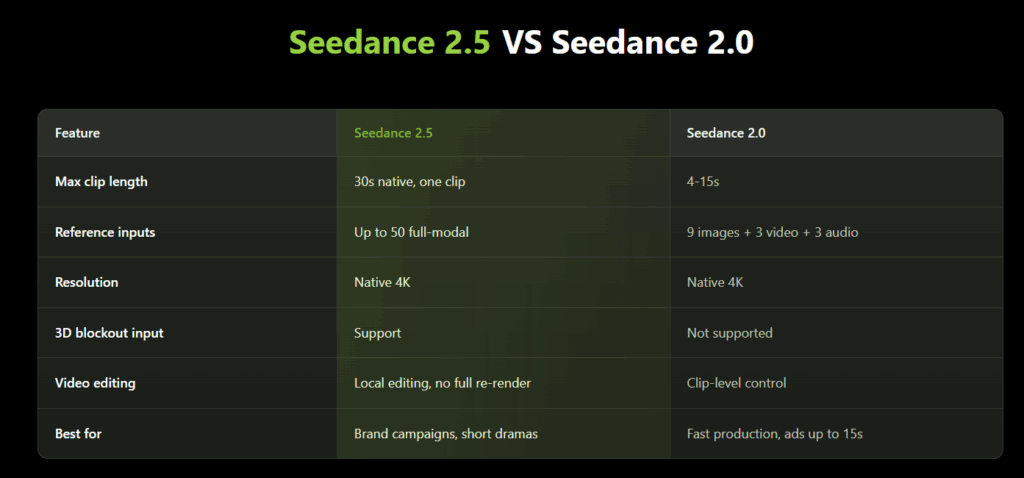
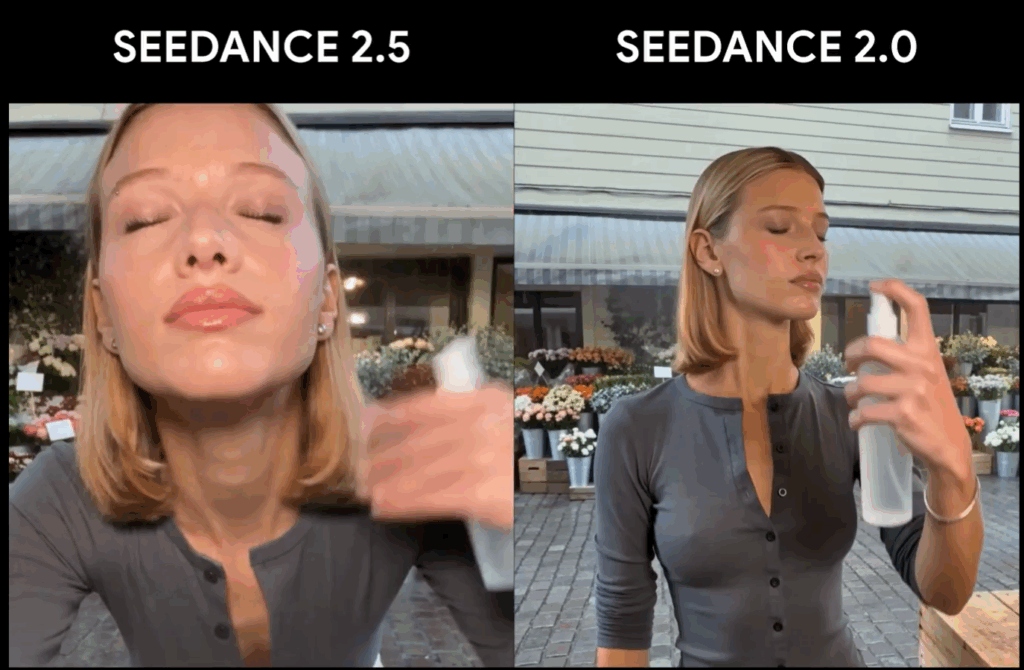
Compared with Seedance 2.0, Seedance 2.5 gives creators more room for longer scenes, more references, and more complex action sequences. That also means a Seedance 2.5 prompt needs to be more structured, especially when timing, camera movement, dialogue, and multiple references are involved.
The main change is simple: Seedance 2.5 prompts do not just need more detail—they need better organization.
Next, let’s look at how to structure a good Seedance 2.5 prompt.
Build a Better Seedance 2.5 Prompt with Clear Structure
There is no single mandatory syntax for every Seedance 2.5 prompt, and you do not need to fill a giant template every time you want someone to blink.
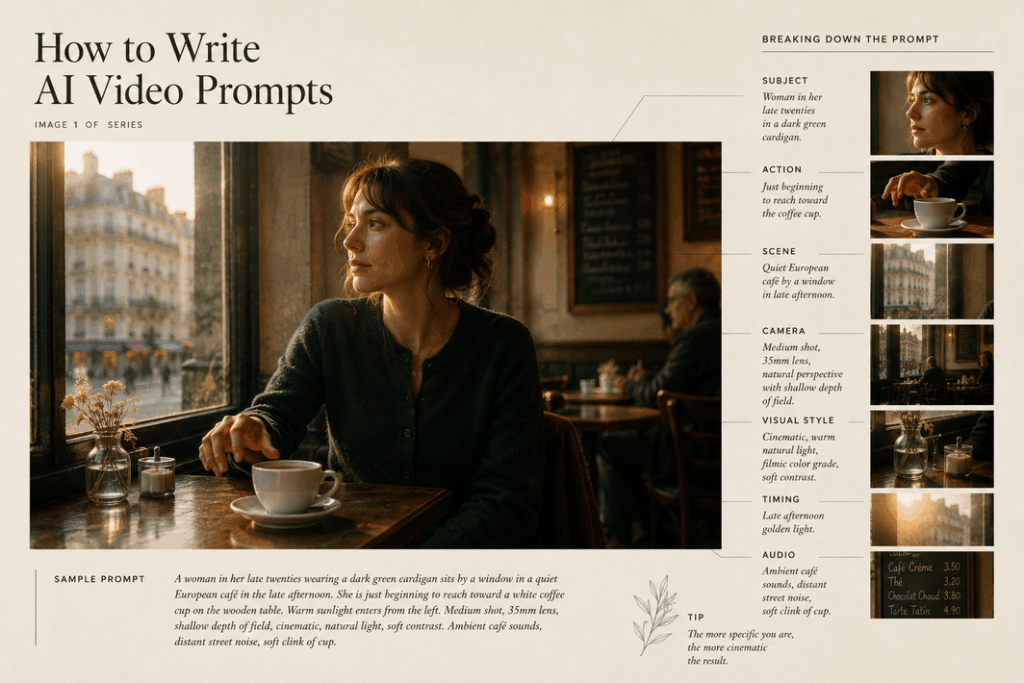
A practical structure is:
Subject + Action + Scene + Camera + Visual Style + Timing + Audio
The important part is not memorizing the formula. It is knowing which information matters for the scene you are trying to create.
1. Describe the Subject Clearly
Start by identifying who or what matters.
Instead of: A woman makes a video.
try: A woman in her late twenties wearing a dark green cardigan sits behind a small wooden desk.
For a product: A matte black over-ear wireless headset with a slim metallic headband rests upright on a white desk.
You do not need to describe every freckle, button, or shoelace. Focus on characteristics that need to remain recognizable.
This becomes particularly important for brand videos and ecommerce. If the product must stay visually consistent, describe the defining structure and use a reference image when possible.
2. Describe Actions in Chronological Order
A weak Seedance 2.5 prompt often piles actions together:
She talks, drinks coffee, checks her phone, waves and gets up.
Technically, those are instructions. Practically, the model has no strong clue about their order.
Instead:
She finishes her sentence while looking at the camera. She reaches for the coffee cup with her right hand, takes one sip, places it back on the table, then looks down when her phone vibrates. After reading the notification, she smiles, waves toward someone outside the frame, and stands.
Now every state leads to the next.
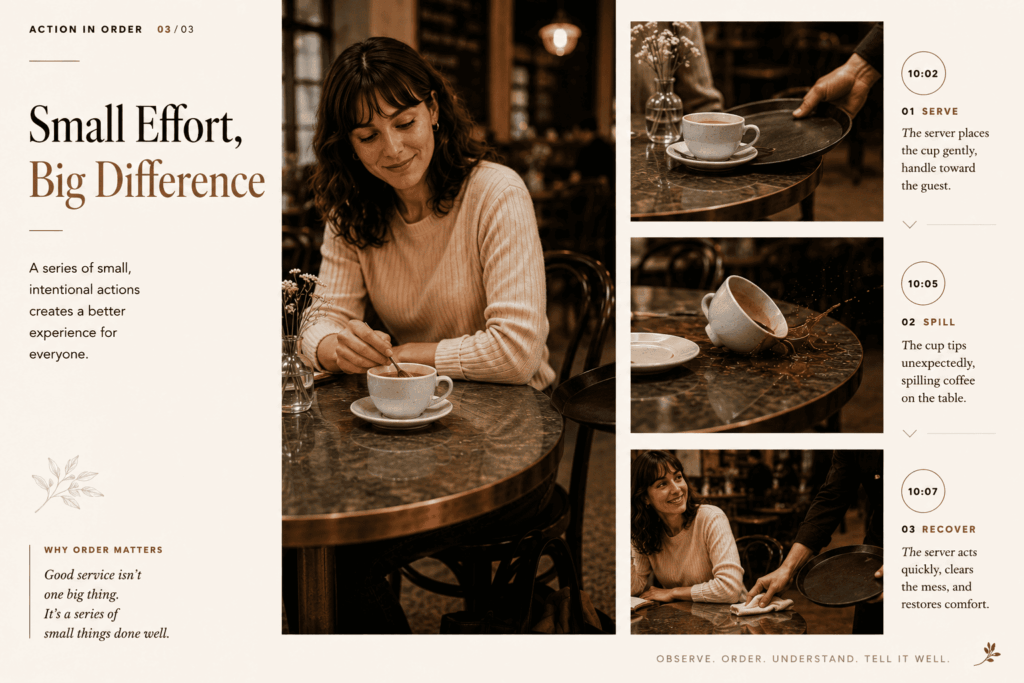
Chronology matters even more when objects interact. Cause should normally appear before reaction.
Instead of:
The customer looks shocked as the cup falls.
write:
The server's tray touches the cup handle. The cup tips toward the edge of the table and hits the floor. The customer hears the impact, looks down, then quickly pulls her bag away from the spill.
The scene has physical logic rather than a collection of simultaneous events.
3. Define the Environment
Your scene tells the model what can reasonably happen around the subject.
Useful information may include:
- Location
- Time of day
- Weather
- Lighting source
- Important furniture or objects
- Background activity
- Overall atmosphere
For example:
A quiet coworking space in the late afternoon. Warm sunlight enters through tall windows on the left. Two people work silently in the distant background while the foreground desk remains uncluttered.
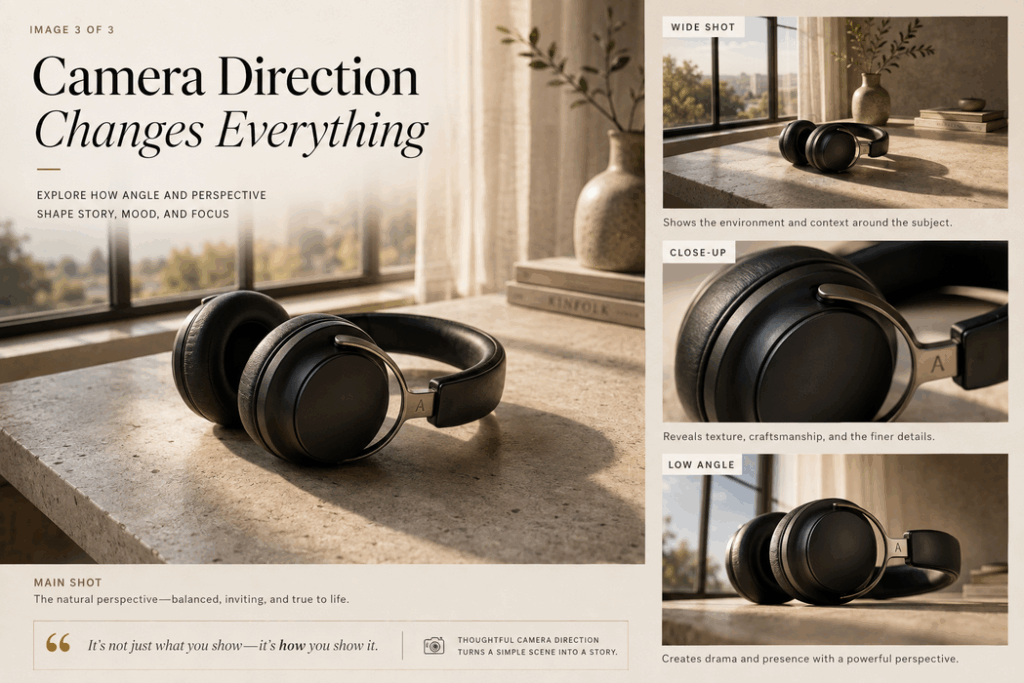
4. Add Camera Direction
“Cinematic” is a mood. It is not a camera instruction.
If the shot matters, tell the model what the camera actually does.
Useful language includes:
- Close-up — emphasizes a face, hand, product detail, or reaction.
- Medium shot — useful for presenters and UGC-style content.
- Wide shot — establishes environment or full-body movement.
- Tracking shot — follows a moving subject.
- Dolly in / slow push-in — gradually moves closer.
- Pull-back / dolly out — reveals more of the surroundings.
- Orbit shot — moves around a subject.
- Overhead shot — useful for food, crafts, desks, and product layouts.
- Low-angle shot — makes a subject feel larger or more dramatic.
- Handheld camera — useful for casual creator and UGC aesthetics.
Avoid stacking every camera technique you know into one Seedance 2.5 camera prompt. More camera terms do not automatically equal more cinema.
Pick movements that serve the action.
5. Define Visual Style Without Hiding Behind “Cinematic”
“Cinematic” is not forbidden. It is simply underspecified.
Instead of: cinematic lighting
try: Soft late-afternoon window light from camera left, gentle shadow falloff, warm skin tones, restrained contrast, shallow depth of field.
Instead of: futuristic style
try: Dark brushed-metal interior, thin cool-white light strips, subtle blue reflections on glass, minimal interface graphics, clean industrial design.
Specific visual choices are easier to interpret than broad aesthetic labels.
How to Use Image, Video, Audio, and Dialogue References More Effectively
References can reduce how much your Seedance 2.5 prompt has to explain, but only if the model understands what each reference is supposed to control.
Uploading several files and writing:
Use these as references.
is a little like handing a film crew three photos, a commercial, and an MP3, then walking away.
A better principle is:
One Reference = One Job
1. Use Image References for Identity and Visual Consistency
Images are particularly useful when appearance matters.
For example:
@Image 1 defines the woman's facial features, hairstyle, and cream blazer. Do not copy the background or pose.
Or:
@Image 2 defines the exact design, proportions, material, and color of the portable blender. Do not copy the tabletop or surrounding objects.
Notice the second sentence.
Defining what not to copy can be just as useful as defining what to copy.
If a reference image contains a perfect product but an irrelevant kitchen, do not make the model decide whether the kitchen matters.
Tell it.
This is especially important for marketing teams working with real products and for creators trying to keep one AI character recognizable across content.
2. Use Video References for Movement and Camera Behavior
A video reference often works better when assigned to motion rather than identity.
For example:
@Video 1 controls only the low side-tracking camera movement and running pace. Do not copy the athlete, clothing, stadium, or lighting.
Then your text defines the new subject and environment.
This avoids asking an image and a video to compete over the same job.
A useful division is:
Image → what something looks like
Video → how something moves
That is not an absolute rule, but it is an excellent default for a Seedance 2.5 prompt.
3. Use Audio References for Voice, Music, or Atmosphere
Audio needs a similarly clear role.
For a creator ad:
@Audio 1 defines the speaker's voice and delivery pace. Keep the background music subtle beneath the dialogue.
For an atmospheric video:
@Audio 1 defines only the background music rhythm. Generate natural café ambience separately and keep all characters silent.
For education:
Use a calm conversational English delivery. Keep interface click sounds quiet enough that they never compete with the narration.
When audio matters, do not leave it as an afterthought. The visual rhythm and audio rhythm affect each other.
4. Write Dialogue as Performance, Not Just Text
Dialogue is another place where Seedance 2.5 prompts benefit from chronology.
Compare:
The woman says, “This bottle keeps drinks cold all day,” and demonstrates it.
with:
0–4s: The woman looks directly into the camera while holding the bottle beside her shoulder and says, “This has been in my bag since breakfast.”4–8s: She stops speaking, places the bottle on the desk, twists the lid open, and tilts it slightly toward the camera.8–12s: Close-up of condensation and ice inside the bottle. No dialogue.12–16s: Return to the medium shot. She smiles and says, “And yes, it's still cold.”
The second version tells the model when talking stops.
That matters.
If dialogue, hand movement, product interaction, facial expression, and camera changes are all requested simultaneously, the generated performance has far more opportunities to become messy.
For talking scenes, think:
Look → Speak → Pause → Act → React → Speak
It feels almost comically literal when written down. That is exactly why it works as a useful prompting discipline.
How to Use Timestamps and Control Complex Actions
Once a Seedance 2.5 prompt contains several events, timestamps become one of the simplest ways to keep the sequence understandable.
1. A Simple Seedance 2.5 Prompt Timeline
For a 30-second product video:
- 0–5 seconds: Establish the product and creator.
- 5–12 seconds: Creator introduces and picks up the product.
- 12–20 seconds: Close-up demonstration.
- 20–26 seconds: Creator reacts and explains the benefit.
- 26–30 seconds: Product hero shot and final line.
A complete Seedance 2.5 prompt could read:
0–5s: Medium shot of a creator sitting at a desk with a compact portable speaker placed in front of her. She looks into the camera and introduces it.5–12s: She picks up the speaker, rotates it slowly to show the front grille and side controls, then places it back on the desk.12–20s: Cut to a close-up of her right hand pressing the play button. The speaker begins playing music. Small natural vibrations are visible on the desk surface.20–26s: Return to the medium shot. She smiles, nods to the rhythm, and comments on the sound while keeping the speaker visible.26–30s: Slow push-in toward the speaker for a clean final product shot. The creator stops speaking. Keep the same product design and desk throughout.
2. Break Physical Actions into Smaller Steps
Complex motion deserves more detail than “does a backflip” or “opens the package.”
For physical interactions, a useful structure is:
Approach → Contact → Movement → Reaction → Recovery
Suppose you want:
A basketball player performs a spin move and scores.
A stronger Seedance 2.5 prompt explains the mechanics:
The player dribbles toward the defender with his right hand. He plants his left foot, lowers his center of gravity, pulls the ball tightly toward his waist, rotates clockwise past the defender, transfers the ball back to his right hand, takes two controlled steps toward the basket, jumps from his left foot, releases a right-handed layup, lands on both feet, and turns to watch the ball enter the hoop.
Seedance 2.5 Prompt Examples for Real Use Cases
Knowing the rules is useful. Copying a structure and changing five nouns is often faster.
The following Seedance 2.5 prompt examples are designed around actual needs for creators, marketers, educators, and casual users rather than abstract demo scenes.
1. Seedance 2.5 Prompt Example for a Creator Vlog
Goal: Create a natural lifestyle clip that feels filmed rather than staged.
Prompt:
Vertical creator-style video in a small bright apartment kitchen in the morning. A young woman wearing an oversized gray sweatshirt prepares iced coffee before work. Begin with a handheld medium shot as she walks into the kitchen and places a glass on the counter. She adds ice, pours coffee slowly, then adds milk and watches the colors swirl together. The camera briefly moves closer for a detailed shot of the liquid before returning to her face. She takes one sip, looks pleasantly surprised, and says in natural conversational English, “Okay, that is way better than yesterday's.” Soft morning window light, realistic skin texture, natural hand movement, ordinary kitchen ambience, subtle ice and pouring sounds. No dramatic commercial lighting.
Why this Seedance 2.5 prompt works:
The prompt defines an everyday environment, chronological action, handheld camera behavior, a clear moment for dialogue, and natural audio. It also explicitly rejects commercial lighting, helping preserve the casual creator aesthetic.
2. Seedance 2.5 Prompt Example for a Product Commercial
Goal: Produce a clean product-focused ad without losing product identity.
Prompt:
@Image 1 defines only the exact appearance, shape, material, buttons, and color of the portable speaker. Do not copy its original background. Place the same speaker on a dark stone tabletop in a minimalist living room at sunset. 0–5s: Begin with a wide static shot as warm window light falls across the speaker. 5–12s: Slow dolly in while the speaker remains completely still. 12–18s: A hand enters from the right and presses the power button once. A small indicator light turns on. 18–24s: Cut to a close-up as music begins and subtle reflections move across the speaker surface. 24–30s: Slow orbit to a three-quarter product hero angle. Preserve the exact same speaker design in every shot. No additional buttons, logos, text, or duplicate products. Subtle room ambience and clean electronic startup sound.
Why it works:
The image reference receives one specific job: product identity. The timeline separates presentation from interaction. Continuity instructions protect the product through camera changes.
3. Seedance 2.5 Prompt Example for a UGC Ad
Goal: Create a social-first UGC-style beauty clip.
Prompt:
Vertical handheld UGC video filmed in a bright bedroom beside a window. A creator holds a small facial mist bottle from @Image 1. @Image 1 controls only the exact bottle shape, cap, label layout, and color. 0–5s: She looks into the phone camera and says, “My makeup always looks dry by three o'clock.” 5–10s: She raises the bottle beside her face and removes the cap. 10–15s: She closes her eyes and sprays the mist twice. Keep the spray fine and physically consistent. 15–20s: She gently taps her cheek with two fingers and looks into a nearby mirror. 20–25s: She turns back toward the camera and smiles. “This is why it stays in my bag.” 25–30s: She holds the product closer to the camera while her face remains slightly out of focus behind it. Natural daylight, realistic phone-camera exposure, minor handheld movement, no glossy studio-commercial look.
Why it works:
The Seedance 2.5 prompt connects a pain point, demonstration, reaction, and closing product shot—the same arc marketers commonly need for short social ads.
4. Seedance 2.5 Prompt Example for Online Education
Goal: Explain a simple software workflow without overwhelming the viewer.
Prompt:
A friendly remote instructor sits beside a large computer monitor in a clean home office. Keep the instructor on the left third of the frame and the monitor clearly visible on the right. 0–6s: Medium shot. The instructor looks at the camera and says, “Here's the fastest way to organize these files.” 6–14s: She stops speaking and turns slightly toward the monitor. The camera remains static while she points to the first folder on screen. 14–22s: She demonstrates moving three files into clearly labeled folders, one at a time. Use quiet interface click sounds. 22–28s: She turns back toward the camera and says, “Now everything is grouped by project instead of file type.” 28–30s: Hold the final organized screen. Consistent presenter appearance, simple natural gestures, neutral office lighting, no dramatic camera movement, clear conversational English.
Why it works:
Remote education usually values clarity over spectacle. This Seedance 2.5 video prompt protects the screen area, separates narration from demonstration, and keeps the camera predictable.
5. Seedance 2.5 Prompt Example for Pure Fun
Goal: Make a ridiculous idea feel oddly believable.
Prompt:
Realistic mock wildlife documentary filmed in a suburban backyard at dawn. A very serious orange cat attempts to steal one slice of toast from a breakfast table. Begin with an extreme close-up of the cat's eyes while a calm documentary narrator says, “The hunter has identified its target.” Cut to a low tracking shot as the cat slowly approaches the chair. It jumps onto the seat, pauses, reaches one paw toward the toast, accidentally knocks over an empty spoon, and immediately freezes. A person outside the frame says, “Milo?” The cat looks toward the voice, grabs the toast in its mouth, jumps down, and runs out of frame. Natural bird sounds, soft morning light, realistic cat movement, deliberately serious documentary camera language. No cartoon expressions.
Why it works:
Because sometimes the best use of an expensive video model is a cat committing breakfast theft. The Seedance 2.5 prompt still follows the same fundamentals: setup, action, cause, reaction, escape, and a defined visual style.
Start Creating with a Better Seedance 2.5 Prompt
A strong Seedance 2.5 prompt does not need to be long. It simply needs to give the model clear enough direction.
You can take any of the Seedance 2.5 prompt examples above, replace the subject, product, environment, or action, and test the result in a Seedance 2.5 AI video generator.
Generate once, review the result, and adjust the part that needs improvement. If the product looks right but the camera feels off, change the camera instruction instead of rewriting the entire prompt. A good Seedance 2.5 prompt guide cannot guarantee a perfect result every time, but it can make each generation more intentional and a lot less random.