
How to Use AI for Studio-Quality Product Photography in 2026
 Jennifer

Still spending thousands of dollars on a single product shoot — only to get results that miss the mark? Studio fees, photographer rates, model costs, and retouching bills add up fast. And when the final images don't deliver, reshoots mean the whole expense starts over. For ecommerce brands trying to move quickly, traditional photography isn't just expensive — it's a bottleneck.
More and more sellers are turning to AI product photography to cut costs, move faster, and scale without limits. Before diving into the how-to, here's a quick look at why the shift is happening.
Traditional vs. AI Product Photography
Not sure if AI product photography is worth the switch? The numbers speak for themselves.
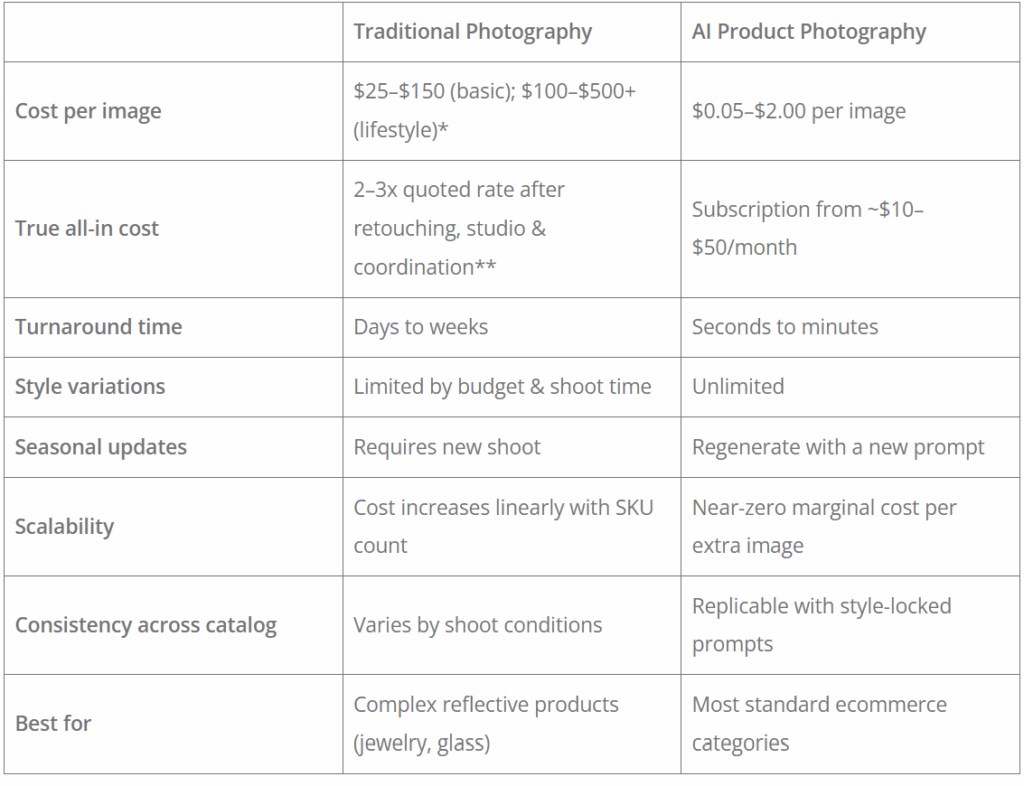
The real cost gap is bigger than it looks. According to Nightjar (2026), quoted rates of $25–$75 per image rarely tell the full story — studio rental, retouching, and coordination routinely push the true per-image cost 2–3x higher. For high-volume sellers, Digital Applied puts it plainly: 500 SKUs at $25/product means $12,500 per shoot cycle. An AI tool at $50/month handles the same catalog for $600 a year.
Ready to make the switch? Here's exactly how to do it.
Step-by-Step Guide to Use AI Product Photography for Ecommerce
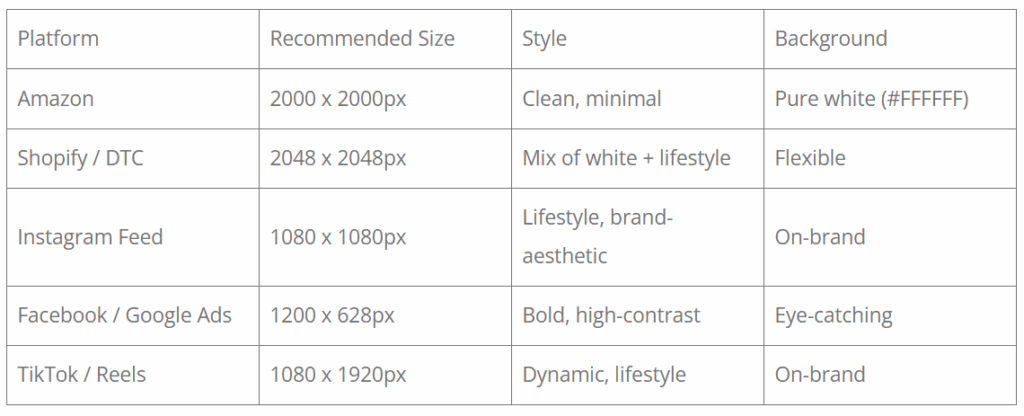
Step 1: Define Your Platform Before Anything Else
Before you touch any tool or take any photo, decide where your product image is going to live. Different platforms have very different requirements — and getting this wrong means resizing, reshooting, or regenerating everything from scratch.
Step 2: Capture a Clean Base Photo
AI product photography tools are only as good as the image you feed them. You don't need a professional studio — but you do need a clean, usable base shot.
- Neutral or white background — makes AI processing significantly cleaner
- Soft, even lighting — avoid harsh shadows or overexposure
- Minimum 2000px on the shortest edge
- Product in sharp focus, filling most of the frame
Step 3: Upload to AI Product Photography Tool
Got your base photo ready? Head over to our AI product image generator and upload your product image directly.
Our platform has Nano Banana, Seedream, and other leading image generation models built in — no switching between tools, no complicated setup. Everything you need is in one place.
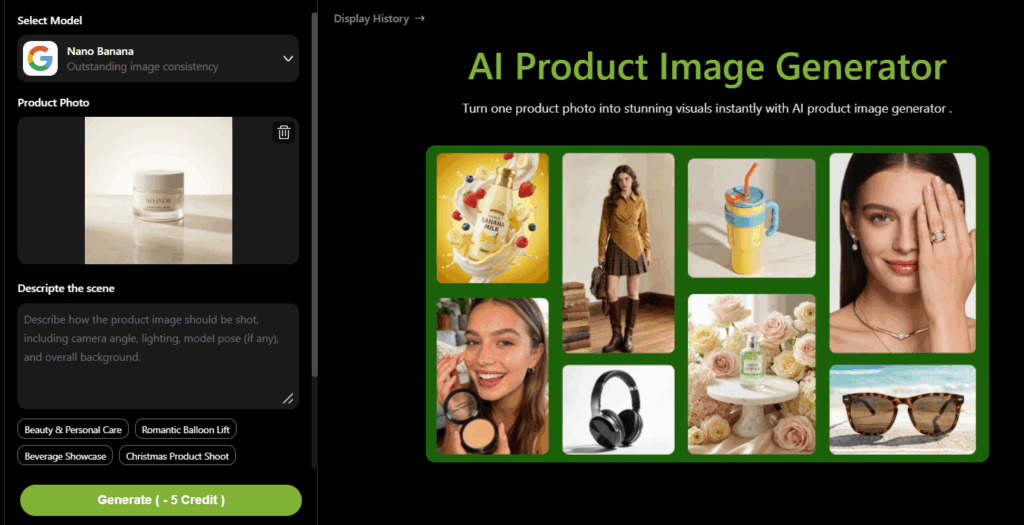
Once your image is uploaded:
- Enter your prompt — describe the shooting style you want. For example:
- "Product on a marble surface, soft natural window light, warm minimalist lifestyle scene"
- "Product centered on pure white background, soft diffused studio lighting, subtle drop shadow"
- "Product against a deep navy background, bold contrast, modern commercial ad style"
- Select your output size — match it directly to the platform you defined in Step 1
- Hit generate — your product image will be ready in seconds
Pro tips:New users get free credits on sign-up — more than enough to test multiple styles and find the visual direction that works best for your product, before spending a cent.
Step 4: Generate Multiple Variations, Not Just One
This is where AI product photography pulls ahead of traditional shoots. Instead of committing to a single look, generate at least 5–10 variations across different styles and backgrounds before making any decisions.
Try varying:
- Background type — white studio, lifestyle interior, outdoor, bold color
- Lighting mood — warm and natural vs. cool and dramatic
- Composition — centered, offset, close-up detail shot
- Seasonal themes — for campaign-specific content
The first result is rarely the best one. Give the AI product photography tool room to surprise you, then pick the strongest performers to move forward with.
Step 5: Review and Quality Check Every Output
AI-generated images need a human eye before they go live. Before approving any image, check for:
- Color accuracy — does the product color match the actual item customers will receive?
- Edge quality — any blurring, ghosting, or unnatural cutouts around the product?
- Proportions — is the product shape or size distorted in any way?
- Lighting consistency — does the product lighting feel natural within the background scene?
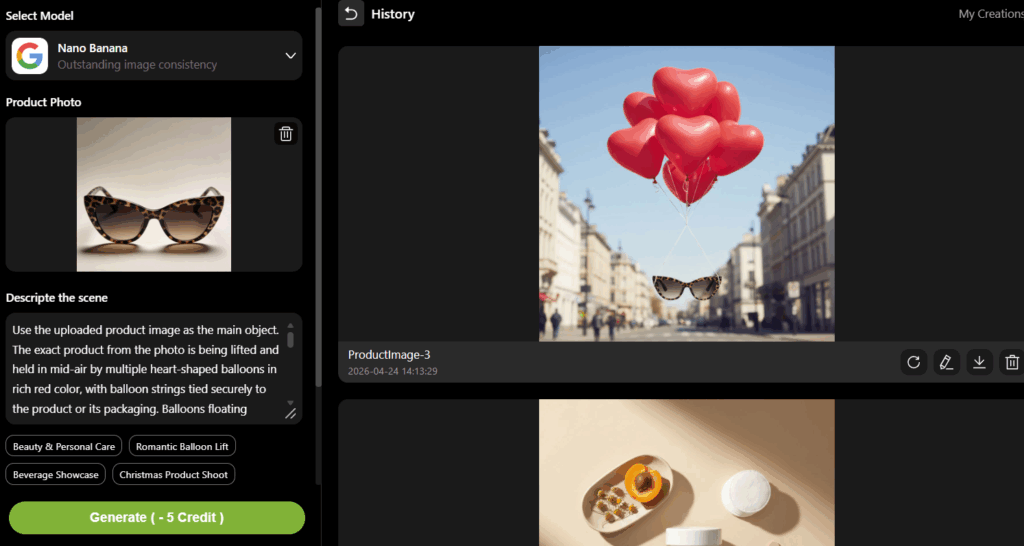
Inaccurate images — even unintentionally — drive up return rates and damage your seller metrics over time. Always compare the AI product photography output side-by-side with your original product photo before publishing.
Step 6: Publish and A/B Test for Performance
Once your images are live, don't set and forget. The real advantage of AI product photography is how fast it lets you iterate — so use that to run proper split tests and let the data guide your visuals.
Where to run tests:
- Amazon — use Manage Your Experiments to test two main listing images
- Shopify — use a CRO tool to test different gallery arrangements
- Meta Ads — run creative split tests directly inside Ads Manager
Metrics to watch:
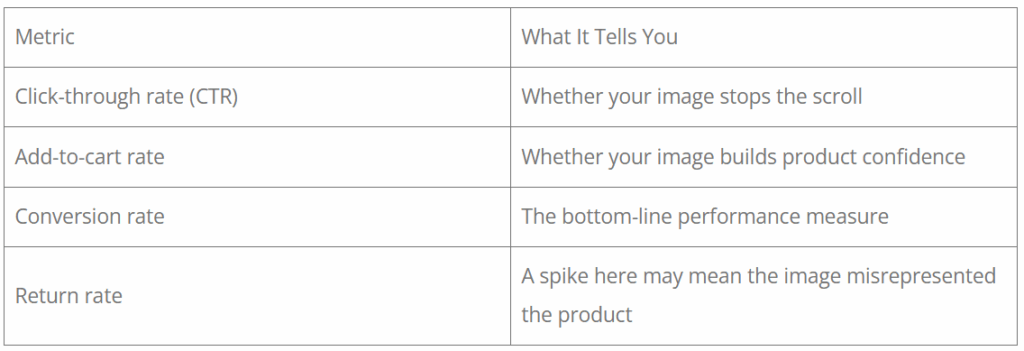
Review performance every 4–6 weeks. Feed what you learn back into your next round of AI-generated variations — and keep improving.
Example Prompts for AI Product Photography
If you're using a text-prompt-based tool (l, well-structured prompts dramatically improve output quality.
To achieve consistent results, many teams use an AI product photography to test and refine different prompt styles.
1. Clean Studio Shot
A high-resolution product photo of a minimalist skincare bottle, centered on a pure white background, soft diffused studio lighting, subtle shadow beneath the product, realistic reflections, ultra-clean composition, commercial photography style.
2. Lifestyle Scene
A premium coffee mug placed on a wooden table in a cozy morning setting, warm natural sunlight coming through a window, soft shadows, light steam rising, blurred background, lifestyle photography, shallow depth of field.
3. Luxury Style
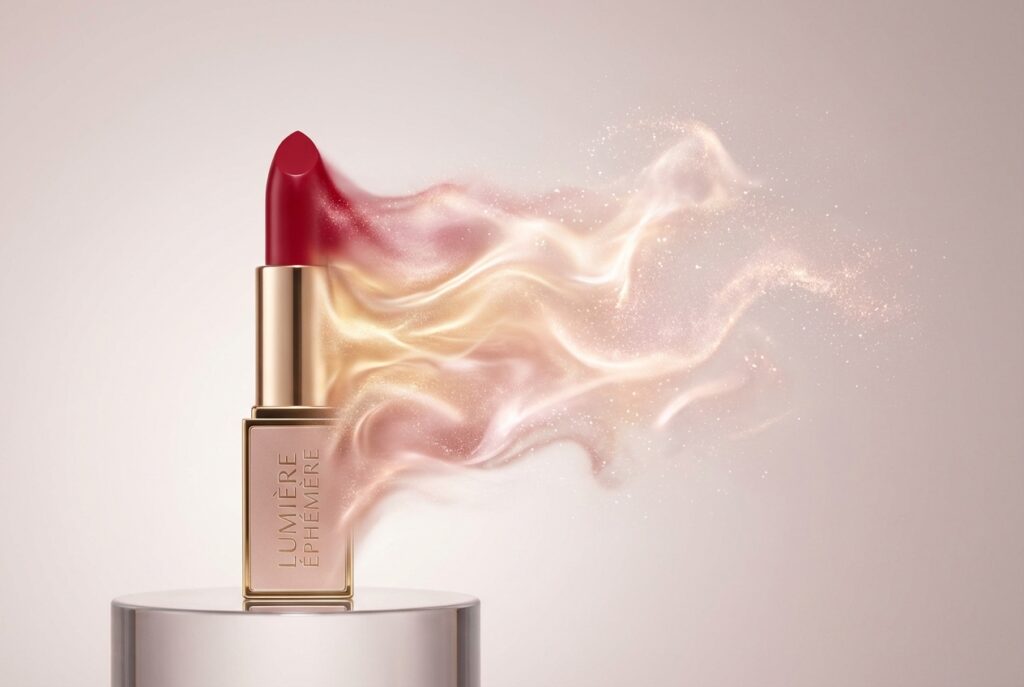
A luxury perfume bottle on a black marble surface, dramatic lighting with strong contrast, golden highlights, dark background, cinematic shadows, high-end commercial photography style, ultra-detailed.
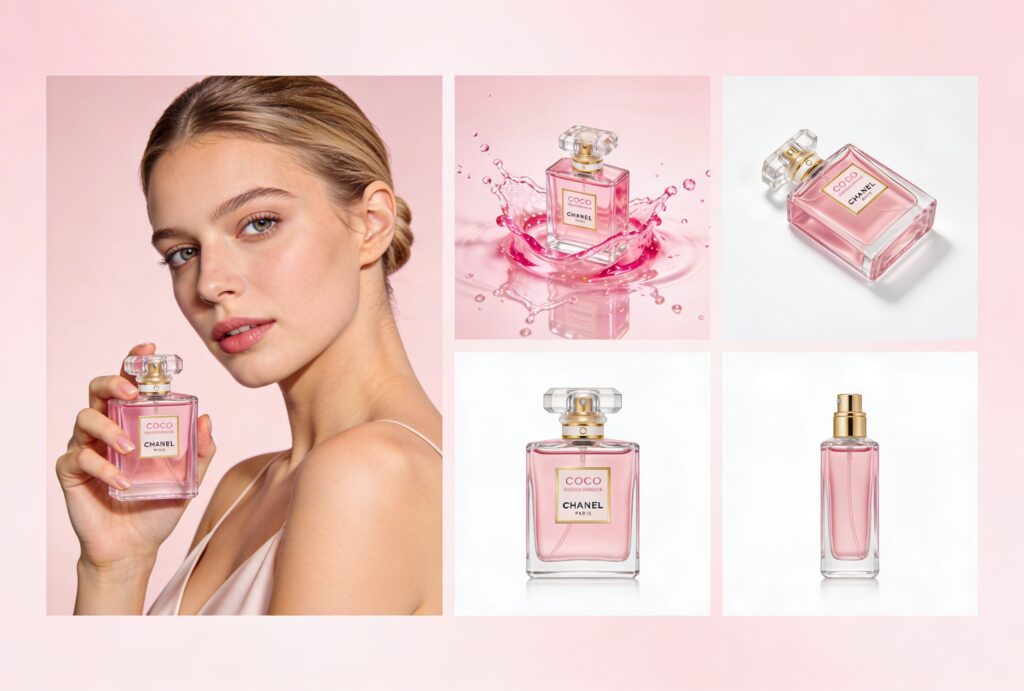
4. Seasonal Visual
A product display with a festive holiday theme, warm glowing lights, decorative elements like pine branches and ornaments, cozy atmosphere, cinematic lighting, high-resolution commercial image.
5. Color Background Variation
A modern product placed on a solid pastel background, soft shadow, minimal style, balanced composition, high-resolution product photography.
6.Model Holding Product (Human Lifestyle Scene)
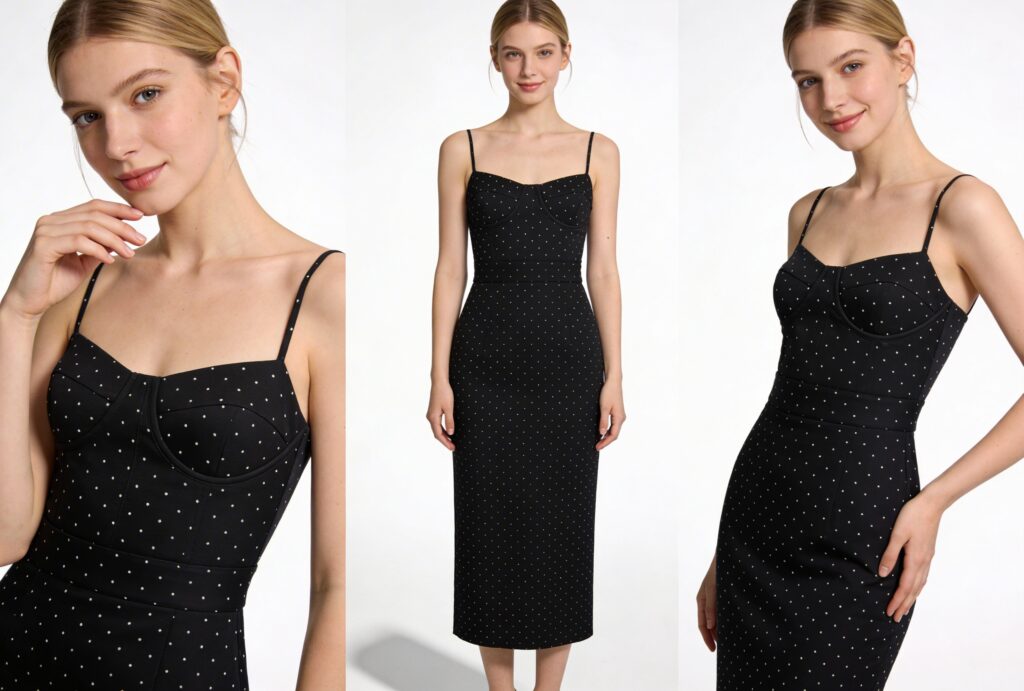
A natural-looking female model holding a skincare product, soft studio lighting, clean background, realistic skin tones, minimal makeup, gentle expression, product clearly visible, lifestyle commercial photography, high-resolution
Key Ecommerce Use Cases
1. Amazon & Marketplace Listing Images
Amazon requires a pure white background (#FFFFFF) for main product images, with the product filling at least 85% of the frame. AI product photography can generate compliant listing images in seconds—no Photoshop required. Typical improvement: Sellers report 15–25% higher click-through rates after upgrading listing images with AI-cleaned backgrounds and shadow effects.
2. Social Media Ad Creatives
Lifestyle images outperform white-background product shots on Instagram and Facebook by an average of 38% (Meta, 2023). AI product photography makes it cost-effective to create multiple lifestyle variants for the same product.
What to test:
- Warm interior vs. outdoor setting
- Seasonal backgrounds (summer, holiday)
- Bold color backgrounds vs. neutral tones
3. Seasonal Campaigns
Holiday campaigns demand fresh visuals. Rather than scheduling reshoots, AI product photography lets you adapt existing product photos to seasonal themes—festive backgrounds, warm lighting, gift-style compositions—in hours.
4. D2C Brand Building
Direct-to-consumer brands need visual consistency across channels. AI product photography allows you to define a visual style (color palette, lighting mood, background type) and apply it uniformly across your entire product catalog.
Best Practices to Maximize Conversion Performance
Keep the product accurate
Customers expect the product to match what arrives. AI product photography can over-saturate colors or alter proportions. Always compare the AI output against the physical product before publishing.
Prioritize clarity over creativity for listings
For product listing pages, clean and clear almost always outperforms artistic. Save bold creative for ads.
Maintain brand visual consistency
Use the same background style, lighting temperature, and color palette across your catalog. Inconsistency signals a low-quality brand to shoppers.
Optimize for mobile first
Over 70% of ecommerce traffic comes from mobile. Check how your images look at thumbnail size and on a 375px screen—not just on desktop.
Don't make images do too much
One strong focal point per image. Cluttered backgrounds reduce product visibility and hurt performance.
Frequent Asked Questions
Can Amazon detect AI-generated product images?
Amazon does not currently use automated detection to flag AI-generated images. The requirement is that images accurately represent the product. As long as the product is not digitally altered in a misleading way (e.g., changing colors or dimensions), AI-generated backgrounds are acceptable under Amazon's image guidelines.
Is AI product photography allowed on Shopify and other platforms?
Yes. Most ecommerce platforms have no specific policy against AI-generated images. The universal rule is that images must accurately represent what the customer will receive.
How realistic do AI-generated product images look?
Current AI product photography tools produce highly convincing results for simple products (apparel, packaged goods, accessories, home goods). Complex reflective or transparent products (glassware, jewelry, electronics with screens) still require more manual refinement to look natural.
How much does AI product photography cost compared to traditional?
Traditional lifestyle photography: $500–$3,000 per product shoot. AI tools: $20–$150/month for unlimited generations. For catalogs of 50+ products, the cost difference is substantial.
Can AI product photography images be used for commercial purposes?
Yes, in most cases. Images created with AI product photography can be used for ecommerce, ads, and social media. Just make sure the tool allows commercial use and that your images accurately represent the product.
Conclusion
The AI product photography is no longer experimental — it's how fast-moving ecommerce brands stay competitive. The brands winning aren't just cutting costs; they're testing faster, launching sooner, and scaling visuals without scaling spend.
Ready to see what it looks like for your products? Start for free today.