Seedream 4.0 for Visuals: Creat AI Talking Ads with Lipsync
This article is written by the team behind lipsync.video, an AI lip sync tool used by marketers, creators, and educators to turn images into talking videos.
While building AI talking ad workflows, we’ve tested Seedream AI—specifically Seedream 4.0—extensively for visual generation.What we noticed wasn’t just how fast Seedream 4.0 creates images—but how often teams get stuck right after. The visuals look great, but the ads still can’t speak.
This article explains what Seedream 4.0 does well, where static images fall short, and how combining Seedream 4.0 with Lipsync turns visuals into high-converting AI talking ads.
What Is Seedream 4.0 and Why Marketers Care
1.Seedream 4.0 in Plain English
Seedream 4.0 is an advanced Seedream AI visual generation model developed within ByteDance’s large-scale AI ecosystem.
It is designed to generate high-quality characters and visual scenes that are not only visually appealing, but also structurally consistent and production-ready.
In plain terms, Seedream 4.0 focuses on one thing many image models struggle with: usable visuals, not just pretty images.
Backed by ByteDance’s experience in content platforms like TikTok and CapCut, Seedream 4.0 is trained with a strong emphasis on:
- character consistency across multiple generations
- clean facial structure suitable for animation and lip sync
- visual clarity optimized for short-form video and advertising
This makes Seedream 4.0 especially effective as a free character creator for marketing, education, and content creation workflows.
Unlike general-purpose image generators that prioritize artistic variation, Seedream 4.0 is built for repeatability and scale.
Marketers can generate a character once, then reuse the same visual identity across ads, landing pages, and multiple languages—without redesigning or re-prompting from scratch.
In short, Seedream 4.0 reflects ByteDance’s core strength in AI-driven content production:
Seedream AI model designed for real distribution, real audiences, and real business use cases.
2.Why Seedream 4.0 Works So Well for Ad Visuals
Seedream 4.0 fits advertising workflows because Seedream AI model focuses on clarity, consistency, and speed.
For overseas marketers and content creators, visual production is often the slowest part of campaign execution. Ads need multiple formats, variations, and characters for different platforms. Seedream 4.0 allows teams to generate brand mascots, animated-style characters, lifestyle scenes, and educational visuals without hiring actors or booking a shoot.
However, in real campaigns, there’s a critical limitation—and it appears after the images are finished.

The Real Problem with Seedream 4.0 Images
1.Beautiful Images That Can’t Talk
Seedream AI image looks great. They stop the scroll. They catch attention.
But they don’t talk.
And in today’s content environment, silence is expensive.Static visuals—even beautiful ones—struggle to compete with short-form videos, talking characters, and interactive content. A Seedream AI image might win the first second of attention, but it often fails to hold it.
- For ads, that’s a conversion problem.
- For educators, it’s an engagement problem.
- For creators, it’s a growth problem.
2.Static Ads Are Losing Attention
Platforms like TikTok, Instagram Reels, and YouTube Shorts clearly favor video. Ads that speak, explain, and look human consistently outperform static visuals.
The real challenge is not generating images—it’s turning visuals into communication.
This is where most Seedream 4.0 workflows stop too early.
Can Seedream 4.0 Be Used for Video Ads?
Seedream 4.0 itself does not generate video or voice. It focuses entirely on visuals—images, characters, and scenes.
To create video ads, especially talking ads, Seedream AI image needs to be combined with a video or lip sync tool. This is where Lipsync becomes part of the workflow. By using Seedream 4.0 as a free character creator and Lipsync for speech and mouth movement, teams can turn static images into AI talking ads without filming or animation work.
This combined workflow is increasingly popular among marketers who need speed, flexibility, and scalable content production.
Seedream 4.0 + Lipsync: A Smarter Ad Workflow
Creating AI talking ads doesn’t need separate tools, complex pipelines, or technical skills.Instead of generating images in one platform and struggling to animate them elsewhere, Lipsync integrates Seedream 4.0 directly into its AI character generator, making the process faster, cleaner, and easier to scale.
Below is a step-by-step breakdown of how this workflow actually works in real projects.
Step 1: Use Seedream 4.0 as a Free Character Creator
Start by using Seedream 4.0 as your free character creator. The process is simple:
- Select the AI model: Seedream 4.0 (or Nano Banana if preferred)
- Enter a text prompt describing your character
- Optionally upload a reference image to guide style or facial features
Seedream 4.0 is widely used as a free character creator because Seedream AI produces consistent, polished visuals suitable for advertising.
With clear prompts, you can generate characters that feel professional, expressive, and brand-ready—ideal for spokesperson ads, explainers, or educational content.This step solves one of the biggest ad production problems: creating characters that look good without hiring designers, actors, or illustrators.

Step 2: Turn Seedream 4.0 Images into Talking Videos
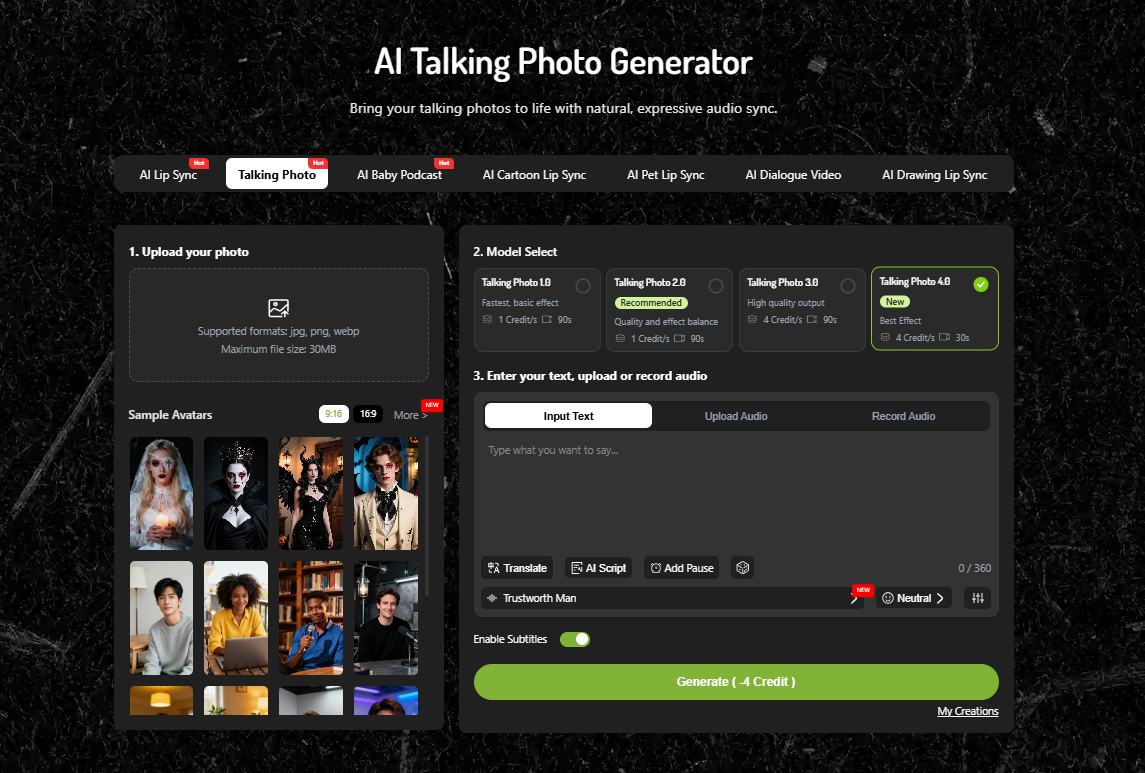
Once your Seedream AI image is ready, move to the AI Talking Photo Generator.
This is where static Seedream AI image become dynamic AI talking ads.
Here’s how it works:
- Upload your generated Seedream AI image
- Select the lip-sync model
- Enter your script text or upload an audio file
Lipsync automatically generates natural mouth movements that match the speech.There’s no animation timeline, no manual keyframes, and no editing software involved.
In minutes, your Seedream AI image goes from silent image to speaking video, ready for ads, landing pages, or social platforms.
Step 3: Launch Talking Ads Without Filming
This workflow removes traditional video production entirely.There’s no need for:
- Cameras or microphones
- Studios or lighting
- Actors or reshoots
Instead, you can quickly create, revise, and localize talking ads by simply changing the text or audio.
For global marketing teams, educators, and content creators, this means faster testing, lower costs, and far less friction.
By combining Seedream AI image with Lipsync’s talking photo technology, teams can produce AI talking ads at the speed modern platforms demand.
Real Use Cases for Seedream 4.0 Talking Ads
1.Brand Spokesperson Videos
Many overseas marketing teams are now using Seedream 4.0 to create virtual brand spokespersons instead of hiring real actors. A single character generated with Seedream AI can represent the brand across multiple campaigns, landing pages, and regions.
Once the character is created using Seedream 4.0 as a free character creator, marketers upload the image to Lipsync and add different scripts for different markets. The same spokesperson can introduce products in English, Spanish, or other languages—without reshooting anything. This approach not only reduces production costs, but also keeps the brand image consistent across all channels.
2.Product Explainer Ads
For product-focused ads, Seedream 4.0 is often used to generate clean, professional characters that explain features or benefits directly to the camera. This works especially well for SaaS tools, AI products, and online services that need clear explanations rather than emotional storytelling.
By combining Seedream AI image with Lipsync, teams can turn static product images into short talking videos where a character explains how the product works, who it’s for, and why it matters. These AI talking ads are commonly used on landing pages and paid ads, where a clear explanation can significantly improve conversion rates.
3.Social Media Short-Form Ads
For content creators and social media marketers, Seedream AI image are often used to produce short-form videos for TikTok, Instagram Reels, and YouTube Shorts. Instead of constantly appearing on camera, creators generate animated or semi-realistic characters with Seedream 4.0 and let them speak through Lipsync.
This approach is especially popular among faceless creators, remote educators, and entertainment-focused accounts. A single Seedream AI image can react to trends, deliver punchlines, or explain ideas in a human-like way—without the creator ever recording themselves. The result is faster content production, less burnout, and more room for creative experimentation.
Build Faster, Smarter Ads with Seedream 4.0
Seedream 4.0 creates the visuals.
Lipsync gives them a voice.
Together, they turn static images into AI talking ads that actually communicate.