
How to Create TikTok Edits with AI Singing Character
 Jennifer
AI Singing Character Videos Go Viral on TikTok
TikTok’s algorithm is built around short, emotionally engaging content, and AI singing character videos fit perfectly into this format. These clips combine expressive character animation, familiar pop culture elements, and music—all of which are powerful triggers for attention and rewatch behavior. When creators transform an image into a singing character video, the result is visually surprising enough to stop the scroll and entertaining enough to encourage sharing. This is also why many tiktok edits incorporate AI singing character to enhance emotional delivery and storytelling. On a platform where creativity thrives, the blend of animation, voice, and emotion makes the singing character style naturally viral.
1、The power of cartoon characters in fan edits
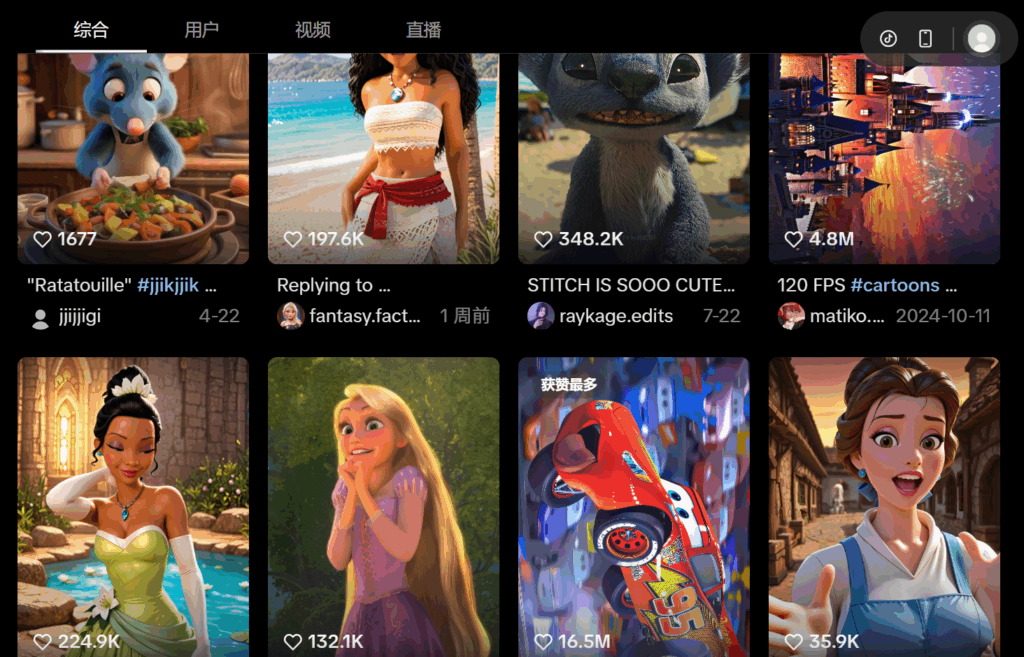
Cartoon characters have timeless visual appeal. Their big expressive eyes, soft color palettes, and charismatic silhouettes make them perfect for music-driven tiktok edits. When these characters appear in a singing tiktok edit—whether it’s inspired by Elsa, Moana, Rapunzel, or a fan-made illustration—the familiarity immediately hooks viewers. Users feel an instant emotional connection, which significantly boosts retention and engagement. For example, nostalgia-driven tiktok edits involving beloved Disney-like characters often outperform generic animations, giving creators a clear advantage.
2、Emotional delivery + music = instant engagement
Music is one of the strongest emotional triggers on tiktok edits. When a singing character performs a popular TikTok audio clip, the combination of vocals, rhythm, and facial expression amplifies engagement. Many tiktok edits rely on emotional buildup, and singing character animations intensify this effect. Algorithms reward content that produces reactions—smiles, surprise, nostalgia, or curiosity—which is why a singing character video often receives more likes and comments than standard photo edits. Tools like lipsync.video make it easy to turn ordinary images into high-impact tiktok edits with expressive animation.
How to Creat an Animated Singing Character Video
Creators on TikTok are constantly searching for new ways to reinvent fan-favorite characters and deliver fresh tiktok edits. AI singing character tools have opened a new dimension of expression by allowing users to animate characters without needing deep animation or editing skills. With platforms like lipsync.video, creators can transform a still image—whether it resembles Elsa, Moana, or Rapunzel—into a dynamic singing character performance. This gives fan edits a unique storytelling layer, letting creators pair iconic characters with trending audio, comedic twists, or emotional scenes to create highly shareable tiktok edits.Below is a practical guide that walks you through the essential steps to turn your idea into a cartoon TikTok edits.
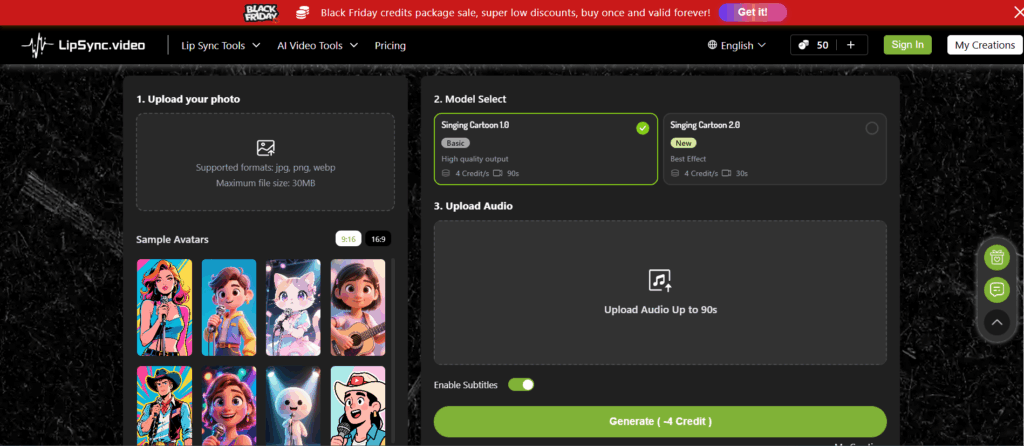
Step 1 – Upload your cartoon image
Start by choosing a cartoon or Disney-style character image that fits your concept. This could be a screenshot, a fan illustration, or an AI-generated design.Once selected, upload the image and prepare it for singing character.
Important: ➡ The final video size is determined by the image size you upload. Uploading a high-resolution portrait helps produce a clearer, more expressive singing cartoon animation.
Step 2 – Add your song or trending TikTok audio
Select the audio that best matches the vibe you want for your tiktok edits. TikTok trends evolve rapidly, so using a popular sound can significantly increase the reach of your singing character video. With lipsync.video, you can upload your own audio or use a TikTok-style track to guide the animation. The tool analyzes the rhythm and vocal cues to create natural lip movements.
Step 3 – Generate a lip-synced singing characterinstantly
Once your image and audio are uploaded, you can generate a fully animated singing character clip with one click. The system automatically maps the vocal patterns onto the character’s facial features, ensuring smooth mouth shapes and expressive movement. This step is where lipsync.video shines—its simple interface allows creators to produce professional-looking results within seconds.
Step 4 – Export and apply TikTok-ready formatting
After generating the animation, creators often enhance the final edit by adding captions, filters, or transitions directly within the TikTok app. Since lipsync.video already handles the lip-syncing and animation, you can focus on adding stylistic touches that match current platform trends.
Best Practices to Make Your AI Singing Character Edit Go Viral
TikTok rewards content that captures attention instantly, and creators often use best-practice frameworks to make their tiktok edits perform better. Optimizing structure, visual style, and audio pairing can significantly boost performance. The following practices help creators maximize their chances of landing on the For You Page while maintaining the clean, expressive style that makes singing character edits so effective.
1、Use close-up portraits for clearer lip sync
A singing character animation works best when the character’s face is clear and positioned close to the frame. Close-up portraits allow the lip-syncing engine to map mouth shapes more accurately, resulting in smoother movement. When using lipsync.video, choosing a high-resolution face image gives the system enough detail to produce a polished Tiktok edits.
2、Add subtitles to boost watch time
Subtitles are a powerful way to capture attention, especially when paired with a singing character performance. Providing subtitles allows users to see the lyrics of popular songs at a glance, enabling them to sing along or search for songs by their lyrics.Even a simple line of text can significantly increase watch time and encourage viewers to listen again. Combining subtitles with a singing character video creates a more dynamic experience.
3、Combine character motion with trending filters
TikTok filters can drastically influence the mood of a singing character video. Soft glow filters complement emotional songs, while bold glitch effects enhance comedic edits. Applying trending aesthetics makes your content feel current and helps it blend into broader platform trends. Since lipsync.video already provides the core singing character animation, filters act as a finishing layer that increases shareability.
What Makes lipsync.video Ideal for Creating AI Singing Character Clips
1、Reliable mouth-movement alignment that feels natural on camera
One of the biggest challenges in generating singing character videos is achieving mouth movement that feels natural and believable. Many tools struggle with matching phonemes to facial shapes, especially when dealing with stylized characters like Disney princesses. lipsync.video solves this with advanced alignment models that track micro-movements and ensure the lip sync stays accurate even during fast lyrics or complex vowel transitions.
For creators, this means you can upload a simple portrait and instantly get a singing character clip that feels expressive rather than robotic. Whether you’re animating animated characters, fan-designed OCs, or cosplay portraits, lipsync.video consistently delivers clean results that look great on TikTok’s vertical format. The platform’s precision is one of the main reasons creators prefer it for producing transformative edits.
2、A smooth workflow that shortens the content-creation cycle
Modern creators often need to produce tiktok edits quickly to maintain engagement and stay aligned with TikTok trends. lipsync.video is designed exactly for this pace. Instead of requiring multi-layer editing or complicated keyframing, the platform enables a streamlined workflow: upload → add audio → generate → download.
This makes the process of creating singing character videos nearly frictionless. You can test multiple audios, re-export versions, or generate several character variations within minutes. For creators who run themed accounts—such as Disney, animation edits, or “princess singing” fan pages—this efficiency is crucial.
The quick workflow also enables creators to respond to trending sounds instantly. When a new audio goes viral, being able to make and publish a lipsync.video singing character within the same hour dramatically increases the chance of hitting the For You Page.
3、Flexible image compatibility for different art styles and fan designs
Another major reason creators rely on lipsync.video is its high compatibility with diverse art styles. Many fans create custom Disney-inspired characters, anime-style princesses, Pixar-style portraits, or stylized cartoon versions of themselves. Traditional lip-sync tools often distort these images or produce mismatched mouths.
lipsync.video is built to handle this diversity gracefully. Whether the input is 3D rendered, hand-drawn, minimalist, semi-realistic, or cel-shaded, the platform adapts the lip-syncing behavior to match the artwork’s natural shapes. This ensures that the final singing character looks cohesive and polished instead of awkward or uncanny.With lipsync.video, TikTok creators routinely combine AI-generated art, hand-drawn sketches, cosplay photos, or 3D characters into fully animated singing character, opening the door for more imaginative edits.
Conclusion
AI singing character tools like lipsync.video are reshaping how creators produce tiktok edits, especially those centered around popular characters and fan content. By combining a single image with trending audio, creators can instantly generate expressive, shareable singing character videos without needing advanced animation skills. From Disney-inspired edits to fan-made illustrations, the possibilities are endless.
In conclusion, AI singing character tools not only save time and effort but also expand creative opportunities, enabling creators to express emotions, humor, and personality in ways previously possible only through complex animation workflows. Whether you are a seasoned TikTok creator or a newcomer, embracing lipsync.video for your singing character edits opens the door to engaging, trend-aligned, and highly shareable content.