Seedance 2.0: Prompt Examples & How to Use Seedance AI
Imagine creating a cinematic, smooth, and dynamic video with just a few words. No professional filmmaking skills, no complicated editing software, and the entire process takes less than ten minutes. The characters move naturally, the lighting feels cinematic, and the details are so refined that it’s difficult to spot any trace of AI.
This is the kind of creative leap that Seedance 2.0 AI promises for video creators.
AI has rapidly reshaped the landscape of video generation, and one of the newest models drawing attention is Seedance 2.0 AI, a powerful Seedance video generator developed by ByteDance. This Seedance video generator allows creators to produce cinematic content quickly and easily. While many AI video tools focus on generating clips from text prompts alone, Seedance 2.0 supports four input types—image, video, audio, and text—enabling richer expression and more controllable generation.
Seedance 2.0 AI shines in its ability to understand and use reference materials, marking one of its biggest breakthroughs:
- Reference images help preserve scene composition and character identity across generated Seedance videos.
- Reference videos allow the model to replicate camera language, complex motion rhythms, and creative visual effects.
- Video extension capabilities enable smooth continuation of existing footage, allowing creators to generate seamless follow-up shots rather than isolated clips.
- Enhanced editing features make it possible to modify existing videos — replacing characters, trimming segments, or expanding scenes.
Video creation has never been only about generating frames; it’s about controlling visual storytelling. Seedance 2.0 AI moves beyond simple multimodal input and introduces a more directable creative workflow, where creators can guide scenes, motion, and style with far greater precision. In other words, you imagine the scene — and the Seedance video generator helps bring it to life.
In this guide, we’ll explore using Seedance 2.0 AI, its key features, example prompts, and how creators can start experimenting with the Seedance video generator right away.
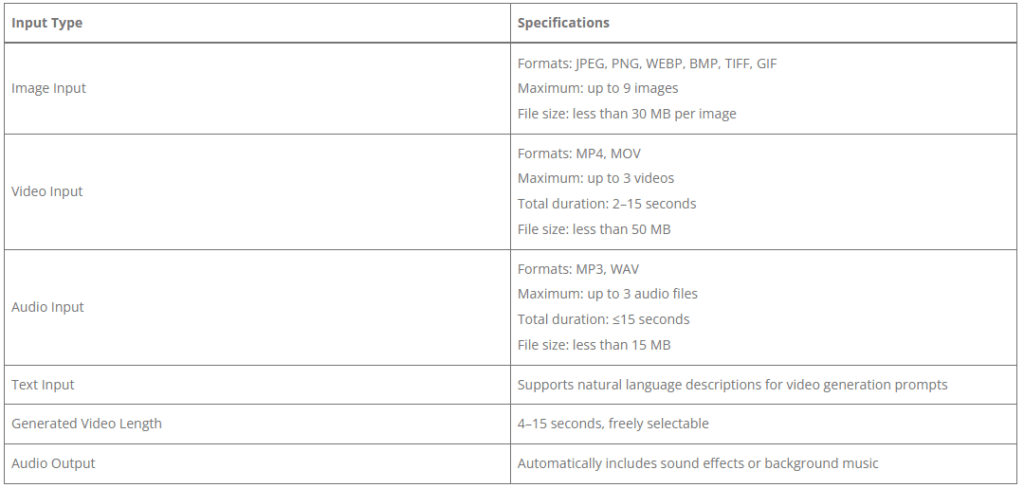
Seedance 2.0 Input Requirements and Generation Limits
According to the official parameters released for Seedance 2.0, it is optimized for generating short cinematic clips rather than long-form videos. This makes it particularly suitable for creating social media content, short advertisements, and concept-driven storytelling.
How to Use Seedance 2.0 to Create Videos
Seedance 2.0 introduces two main interaction methods depending on how many reference materials you want to provide. Using a well-structured Seedance prompt helps guide the AI more effectively and ensures consistent, cinematic results.
First / Last Frame Mode
The easiest way to create a video with Seedance 2.0 is to provide a single image—either as a starting or ending frame—together with a descriptive prompt. From there, the Seedance 2.0 automatically generates the motion, scene development, and cinematic flow, turning your idea into a dynamic video with minimal effort.
Seedance Example prompt
@image1 as the first frame
A cinematic shot of a girl standing on a windy cliff, her hair moving in the wind, sunset lighting, dramatic atmosphere
This mode is ideal for beginners who want to quickly experiment with image-to-video generation.
Understanding the @ Syntax in Seedance AI
The @ syntax is one of the most important parts of Seedance AI prompts. Instead of writing long descriptions, you assign specific roles to assets using @ references.
For example:
@image1 as main character
@video1 as camera movement reference
@audio1 as soundtrack
This structure tells the AI:
- What each asset represents
- How it should influence the generated video
Without this syntax, the model would need to guess how to interpret each input. In practice, the @ syntax acts like a directing tool, allowing creators to orchestrate characters, camera movement, and atmosphere within a single prompt.
Key Capabilities of Seedance 2.0 (With Prompt Examples)
Seedance 2.0 is not just another AI video generator. What makes it stand out is the ability to control visual consistency, motion, editing, and storytelling using multimodal references.
Below are some of the most notable capabilities creators are exploring, along with simplified prompt examples using the @ reference syntax.
1. Stronger Visual Consistency
One of the most common problems in AI video generation is inconsistent characters and scene details. Faces change between frames, product details disappear, and small text becomes unreadable.
Seedance 2.0 focuses heavily on solving this problem. From facial identity and clothing details to typography and scene structure, the model maintains stronger consistency throughout the generated video.
This makes it particularly useful for storytelling videos and product commercials.
Seedance Prompt Example
@image1 as main character referenceA tired office worker walks out of an office building late at night.
Streetlights cast a warm glow as he rubs his shoulder while walking home.The camera slowly moves closer to his face. He sighs softly, closes his eyes for a moment, then smiles gently as if leaving the stress of the day behind.As he opens the door, warm light spills out. His young son runs toward him holding a stuffed toy, and a small cat jumps off the sofa and follows.
2. Precise Replication of Complex Camera Motion
Previously, replicating complex cinematic camera movements required extremely detailed prompts — and even then the results were unpredictable.
With Seedance 2.0, users can simply upload a reference video, and the model will learn the motion style from it.
This allows creators to replicate tracking shots, rotating camera movements, or choreographed action sequences.
Seedance Prompt Example
@video1 as character action reference
@video2 as camera movement referenceGenerate a dramatic fight scene between two characters under a starry night sky.
White dust rises as they clash.Use the movement style from @video1 and the rotating cinematic camera movement from @video2.
The fight choreography should feel dynamic and intense.
3. Creative Template and Visual Style Recreation
Seedance 2.0 can recreate complex advertising styles, cinematic transitions, and visual storytelling structures by analyzing reference videos.
Instead of describing every detail, creators can simply show the model how the visual rhythm works.
Seedance Prompt Example
@image1 as product reference
@image2 as feather texture reference
@image3 as swan reference
@video1 as advertisement style referenceCreate a cinematic commercial for a winter down jacket.Follow the storytelling rhythm of @video1.
Use the softness of feathers and the elegance of swans to visually represent warmth.Voiceover line:
"This is goose down. This is warmth.
This is the down jacket that feels like wearing the Arctic swan."
4. Creative Story Completion
Seedance 2.0 can expand partial prompts into more complete story scenes.
Instead of manually scripting every frame, creators can provide initial scenes and references, allowing the model to generate logical narrative progression.
Seedance Prompt Example
@image1 as comic panel reference
@video1 as storytelling style referenceRecreate the scenes from @image1 in a comic-style animated sequence.Maintain the dialogue from the images.
Add humorous sound effects and dynamic scene transitions.Follow the pacing and storytelling rhythm of @video1.
5. Seamless Video Extension
Another powerful feature is the ability to extend existing video clips smoothly.
Instead of generating a disconnected clip, Seedance can continue the scene naturally.
Seedance Prompt Example
@video1 as base sceneExtend the video by 15 seconds.1–5s: Sunlight slowly moves across a wooden table through window blinds.
6–10s: A coffee bean falls gently from above as the camera slowly zooms toward it.
11–15s: The screen fades to black and text appears:"Lucky Coffee"
"Breakfast"
"AM 7:00–10:00"
6. More Realistic Audio Generation
Seedance 2.0 also improves audio generation, including voice narration, ambient sound effects, and background music.
This makes it easier to create short documentary-style or commercial-style videos.
Seedance Prompt Example
@image1 as building reference
@video1 as narration voice referenceCreate a 15-second cinematic documentary-style video.Use a widescreen 2.35:1 aspect ratio and realistic lighting.
Show different companies working inside a modern office building.Narration voice should match the tone of @video1.
Explain how the building forms a dynamic business ecosystem.
7. Better Long-Take Cinematic Shots
Seedance can generate smoother, continuous shots, often referred to as “one-take” scenes.
These types of scenes are commonly used in films because they create immersive visual storytelling.
Seedance Prompt Example
@image1
@image2
@image3
@image4
@image5Create a first-person roller coaster ride scene.The camera moves continuously without cuts as the roller coaster accelerates faster and faster.
The environment becomes more intense as the ride progresses.
8. Powerful Video Editing Capabilities
Seedance 2.0 is not limited to generating new videos. It can also edit existing videos without rebuilding the entire scene.
This allows creators to modify characters, adjust actions, or change story outcomes.
Seedance Prompt Example 1 — Character Replacement
@video1 as base video
@image1 as new singerReplace the female singer in @video1 with the male singer from @image1.
Maintain the original camera movement and performance style.
The band continues playing music without scene cuts.
Seedance Prompt Example 2 — Story Reinterpretation
@video1 as base sceneRewrite the ending of the story.The man's gentle expression suddenly turns cold.
He pushes the woman off the bridge into the water without hesitation.She looks up in disbelief and shouts:
"You were lying to me from the beginning!"The man smiles coldly and whispers:
"This is what your family owes mine."
9. Music Beat Synchronization
Seedance can align scene transitions and actions with the rhythm of a soundtrack.
This is especially useful for music videos, short-form content, and rhythm-based edits.
Seedance Prompt Example
@image1
@image2
@image3
@image4
@image5
@image6
@video1 as rhythm referenceCreate a landscape montage video.Scene transitions should follow the editing rhythm of @video1.
Match scene changes and motion to the beat of the background music.
10. Stronger Emotional Expression
Another improvement is the model’s ability to capture facial expressions and emotional intensity.
This helps create more dramatic storytelling moments.
Seedance Prompt Example
@image1 as first frame
@image2 as facial reference
@image3 as emotional expression reference
@image4 as transformation referenceThe camera rotates and slowly zooms toward the character.The character suddenly raises their head and shouts loudly with exaggerated comedic emotion.Then the character transforms into a large bear, maintaining the dramatic energy of the scene.
Essential Prompt Writing Techniques with Seedance 2.0
To get consistent, high-quality results, it’s important to write prompts in a structured and intentional way. The following practices can help guide the model more effectively and produce more cinematic videos when using Seedance 2.0.
Start with “Who does what where.”
A clear prompt usually begins with a simple structure: subject + action + scene. This helps the model quickly understand the core idea of the video before adding stylistic details. For example, a prompt like “A girl running in the rain” clearly defines the character, what they are doing, and the environment where the scene takes place.
Use @ to specify asset roles
When you upload images, videos, or audio files, it’s best not to rely on the model to interpret their roles automatically. Instead, explicitly assign each asset using the @ symbol. For instance, you might define @image1 as the first frame of the video or use @video1 as a reference for camera movement.
Include camera and motion cues
Adding camera instructions helps shape how the scene unfolds visually. Simple cues such as slow zoom, top-down shot, or tracking shot can guide the model toward more dynamic and cinematic results. Even short motion descriptions can significantly improve the sense of movement in the generated video.
Describe the atmosphere and lighting
Visual mood plays a major role in how a video feels. Including lighting and atmosphere descriptions—such as warm sunset tones, soft backlighting, or cinematic color grading—helps the model create a more polished and visually consistent result.
Double-check multiple assets
When working with several uploaded files, make sure every @ reference is correctly assigned to the intended asset. It’s also helpful to prioritize materials that most strongly influence the visual composition and timing. A practical setup is to upload 3–5 key images, 1–2 reference videos, and one audio file, while leaving some buffer for additional references if needed.
Full access to Seedance 2.0 is coming soon, but you can start creating fun, engaging videos right now with Seedance 1.5 Pro. Simply upload images, write a prompt, and Seedance 1.5 Pro will automatically generate video and audio for you.
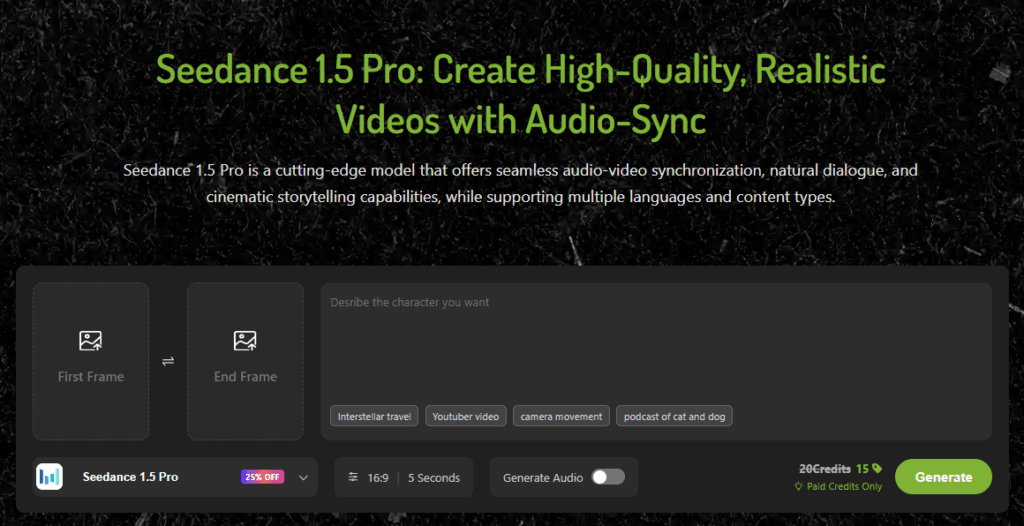
For example, popular YouTube and TikTok cat podcasts or interviews can be made entirely with Seedance 1.5 Pro:
Prompt Example:
Host (looking at the white cat):
"Do you have any retirement plans?"White cat (angrily):
"I hope social security covers catnip."Then the white cat gives a mischievous smile, shrugs its shoulders, and proudly says:
"Otherwise, I'm doing crime."While the white cat is speaking, the orange cat doesn’t say anything and keeps playing with the air, swiping at nothing with its paw.After the white cat finishes, the host turns to the orange cat and asks:
"And what about you?"Orange cat (happily):
"I think I'll move to Florida."
Then the orange cat shows a mischievous grin and adds excitedly:
"Knock some drinks off retirement home tables."After the orange cat finishes speaking, both cats burst out laughing, leaning forward and backward from laughing so hard.The host rubs their head helplessly and starts laughing along with them.
This workflow is perfect for creating short storytelling videos, social media content, or fun interviews with talking characters—all with minimal effort.
The Future of Seedance Video Creation
AI video technology is evolving rapidly, and models like Seedance are making cinematic video creation accessible to everyone. For creators, marketers, and storytellers, this means video production could become far more accessible—transforming how digital content is created.
While Seedance 2.0 will soon provide even greater control over characters, motion, and visual storytelling, you can start turning your ideas into reality today—whether it’s a talking cat podcast, an animated short story, or social media content.
Get hands-on with Seedance 1.5 Pro, and experience how simple, fun, and fast video creation can be. Seedance AI helps creators bring ideas to life, whether it’s for short storytelling videos, social media content, or dynamic AI-powered visuals.