Top 5 HeyGen Alternatives for AI Video Generator
If you're searching for the best heygen alternatives, you're not alone. As AI-generated video becomes mainstream in marketing, education, and entertainment, creators are comparing tools more critically than ever.
HeyGen has become one of the most visible AI video generators for talking avatars. It’s clean, easy to use, and works well for corporate-style presenter videos. But as AI content creation evolves, many creators and marketers realize they need more than a basic avatar studio.
This guide breaks down the most practical heygen alternatives for content creators, overseas marketers, remote educators, and entertainment users — so you can choose based on workflow, not hype.
What Is HeyGen ?
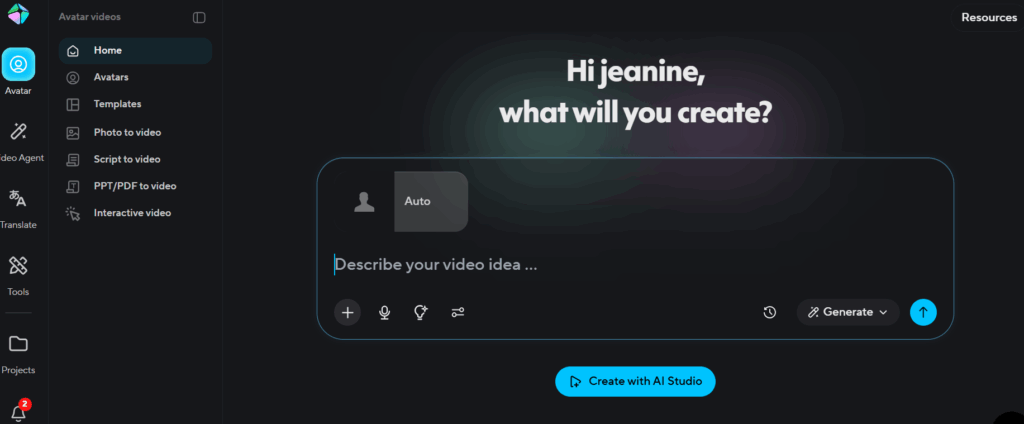
HeyGen is an AI video generator built primarily around avatar-based video. Users can:
- Select a digital avatar
- Input a script
- Generate talking-head style video
It’s designed for structured presentation content such as:
- Corporate training
- Product explainers
- HR onboarding
- Internal communication
As an AI video generator, HeyGen simplifies the process of turning scripts into avatar-led videos. However, the workflow is centered around predefined avatars and preset expressions. While this works well for presentation-style content, it can feel restrictive for creators who need more dynamic formats.
This is where interest in heygen alternatives begins to grow.
Why Look for HeyGen Alternatives?
As AI video creation becomes part of daily workflows for creators, marketers, educators, and even casual users, the limitations of “one-size-fits-all” avatar platforms become obvious.
HeyGen works well for scripted avatar videos. But many users quickly hit friction points:
- Content creators want faster iteration, not heavy avatar setup
- Marketers need localized ad variants at scale, not one polished video
- Educators care more about clear speech, subtitles, and trust, not hyper-real avatars
- Entertainment users want talking, singing, and playful dubbing, not corporate presenters
This is why “best HeyGen alternatives” has become a high-intent search term. Users are not abandoning AI video—they are refining what they actually need.
Most people looking for HeyGen alternatives fall into four real-world scenarios:
- You already have images or short videos and just want them to talk naturally
- You need multilingual dubbing and subtitles, not new avatars
- You want lower cost and faster output for testing content
- You want tools that fit into marketing or content pipelines, not standalone studios
That’s where specialized HeyGen alternatives start to outperform general avatar platforms.
How to Pick the Right AI Video Generator?
The rise of heygen alternatives isn’t about abandoning AI video. It’s about specialization. Most users fall into these real-world needs:
1. Use Case Alignment
Before comparing HeyGen alternatives, ask one question:
What is this video for?
- Content creators need speed, flexibility, and low friction
- Overseas marketers need scale, localization, and A/B testing
- Remote educators need clarity, subtitles, and trust
- Entertainment users want expressive, fun, low-barrier tools
A creator making TikTok-style clips has very different needs from an HR team making onboarding videos. You need to select the tool that best suits your workflow from Heygen alternatives.
2. Languages & Voices
If your audience is global, languages and voices matter more than avatars.
Key questions:
- Does the tool support natural-sounding multilingual dubbing?
- Can subtitles be generated and edited easily?
- Does lip sync stay accurate after translation?
Many HeyGen alternatives outperform in voice quality and localization, especially when video realism is not the top priority.
3. Pricing Structures
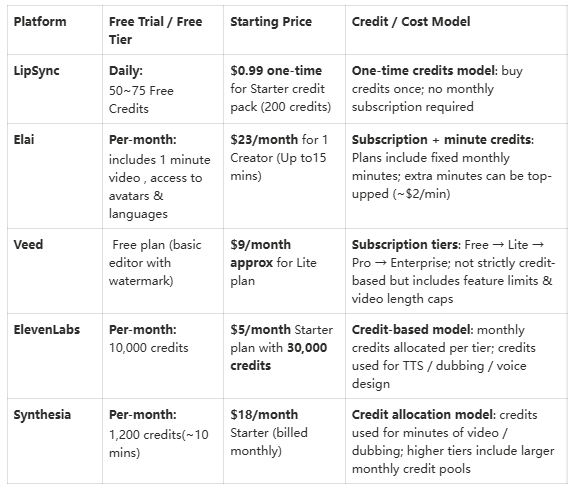
Pricing varies widely across heygen alternatives, and understanding the model is key to choosing the right tool. Most platforms use one of these approaches:
- Per-minute or per-credit pricing — You pay for the exact length of video or voice you generate. Ideal for creators who produce content sporadically and want control over costs.
- Monthly subscription plans — You pay a fixed fee for a set of features, export minutes, or credits. Best for creators and marketers producing content consistently and needing predictable budgeting.
- Flexible credit top-ups — Some platforms let you buy extra credits or minutes on demand, so you don’t overpay for unused capacity.
For content creators, marketers, and educators, the most practical heygen alternatives are those that allow cheap iteration and experimentation without forcing a large upfront investment per finished video.

Top 5 HeyGen Alternatives for AI Video Generator
Below are popular HeyGen alternatives, each excelling in different scenarios.
1. VEED —— Editing-First AI Video Generator with Timeline Control
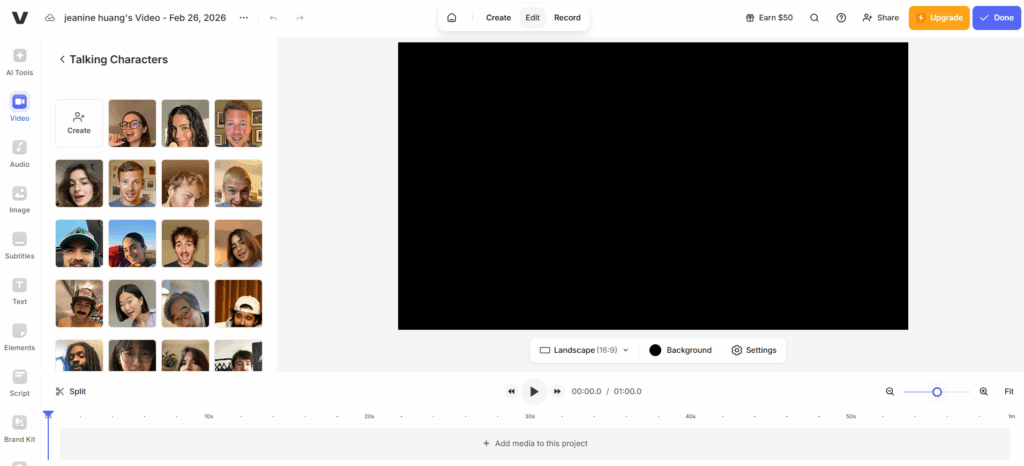
Veed feels less like a traditional avatar platform and more like a full browser-based editing suite with AI built in.The avatar feature is just one layer inside a much broader ecosystem that includes timeline editing, subtitle automation, background removal, eye-contact correction, screen recording, short-form clipping tools, brand kits, and a large AI model playground.
If you're expecting a streamlined avatar studio, the interface may feel overwhelming at first. There are many buttons, many layers, and many panels. But among creative-focused heygen alternatives, Veed shines in flexibility.
What are VEED’s strengths?
- Professional timeline editing
- Strong AI model integration
- Collaboration tools: Team commenting, shared projects, and cloud-based workflows make it suitable for marketing teams.
- Unique “Keep Background Audio” feature:
What are VEED’s weaknesses?
- Limited avatar expressiveness
- Interface complexity
- Limited gesture control
2. Synthesia —— Enterprise Avatar AI Video Generator for Corporate Training
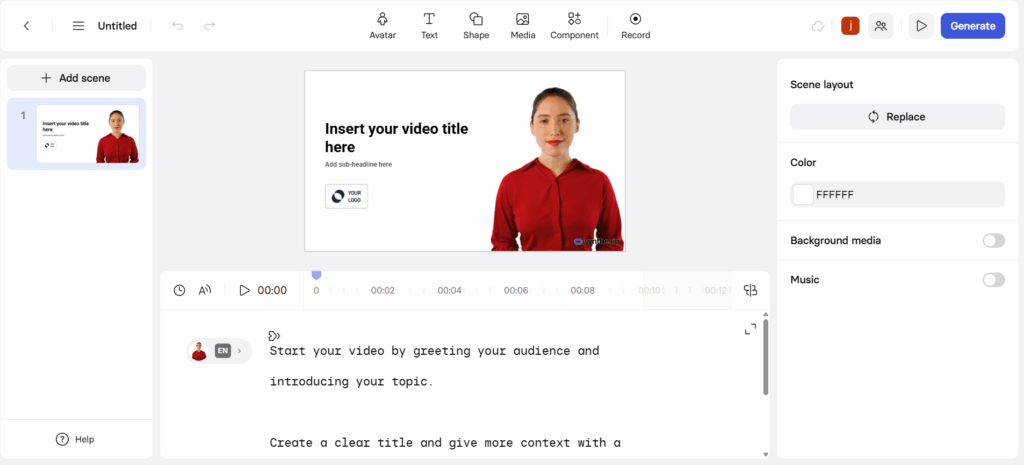
Synthesia focuses on enterprise-ready AI avatar videos. The first thing that stood out is corporate communication.
The workflow is straightforward: you select a template, choose an avatar, paste your script, generate voiceover, and export. There’s no timeline-based editing like VEED. Instead, it feels more like building slides in PowerPoint, except your presenter is an AI avatar.
The interface is clean, predictable, and very “enterprise-friendly.” You’re not overwhelmed by creative tools. But you’re also not given much flexibility beyond what’s pre-defined.
What are Synthesia’s strengths?
- Professional-looking corporate avatars
- Clean and simple script-to-video workflow
- Strong language support
What are Synthesia’s weaknesses?
- Limited avatar emotional range
- Minimal gesture control
- No advanced timeline editing
3. ElevenLabs – Advanced AI Voice Engine for Dubbing
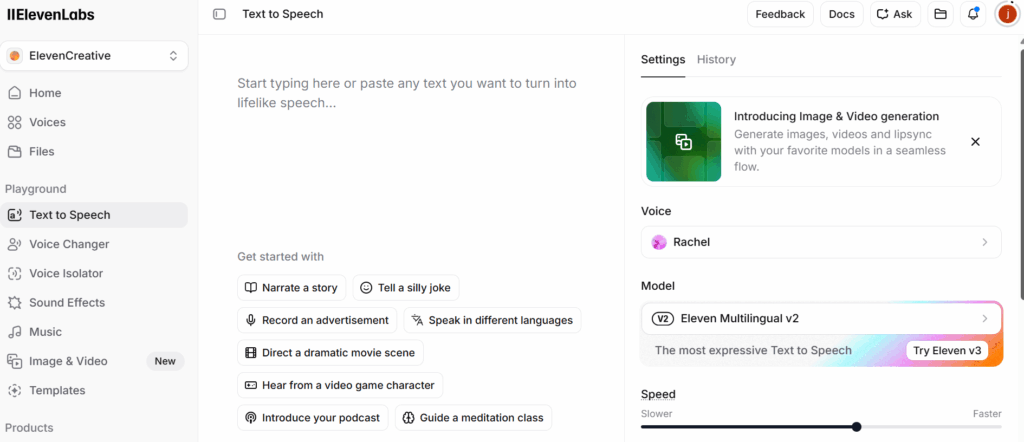
Unlike most HeyGen alternatives, ElevenLabs is not an avatar platform. It’s a voice AI company. There is no visual editing timeline. No avatar scene builder. Instead, you focus entirely on voice quality — cloning, emotional control, multilingual tone consistency, and API access. If you already have a video editing pipeline and just need industry-leading voice quality, ElevenLabs fits perfectly. If you want to create talking videos, users must combine ElevenLabs with a lip sync video tool.
What are ElevenLabs’ strengths?
- Industry-leading voice realism
- Excellent emotional tone control
- High-quality voice cloning
- Multilingual voice consistency
What are ElevenLabs’ weaknesses?
- No avatar generation
- No video editor
- Advanced features behind higher pricing
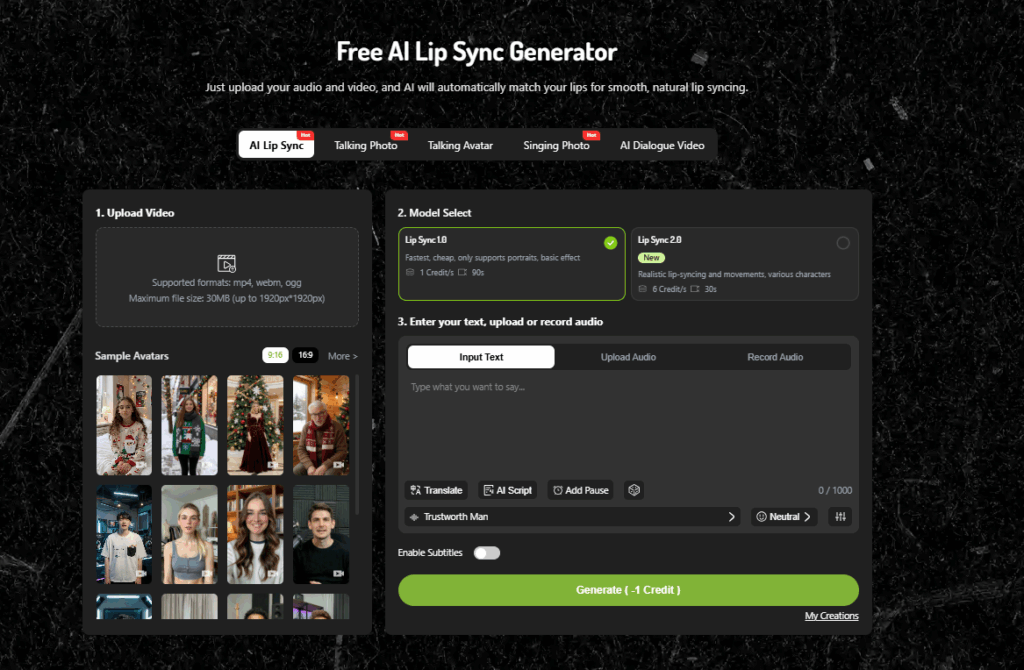
4. LipSync —— All-in-One AI Video Generator
Among all heygen alternatives, LipSync is built for creators and marketers who need speed, flexibility, and full control from idea to published video.This is where it separates itself.
4.1 Complete From-Zero-to-Publish AI Video Pipeline
Most heygen alternatives solve only one part of the process.LipSync covers the entire chain.
You can:
- Generate video directly from text prompts
- Generate an image and use it to creat video on this platform
- Add multilingual voiceover
- Auto-generate subtitles
- Export platform-ready formats
All inside one platform.This dramatically reduces production friction for content creators.
For overseas marketers running ads in several languages, switching between tools is not just inconvenient — it’s expensive.LipSync eliminates that fragmentation.
LipSync is optimized for high-output creators who value speed without sacrificing realism.Among practical heygen alternatives, this workflow integration is a major advantage.
4.2 Performance-Driven Video Creation (Talking, Singing, and Dubbing)
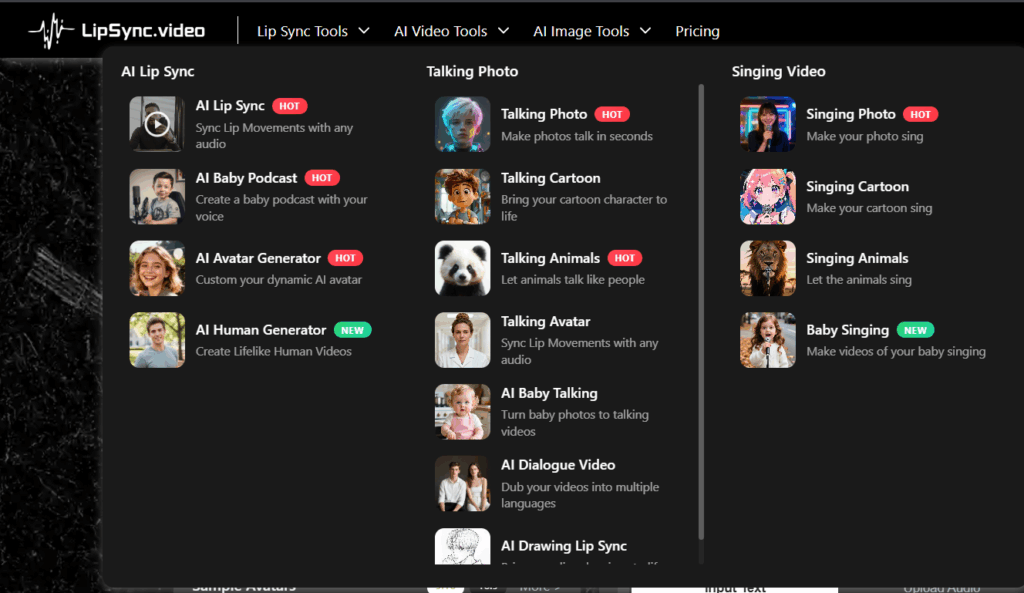
Unlike many heygen alternatives that focus only on talking avatars, LipSync expands beyond basic speech generation.
- AI talking photo with precise lip synchronization
- AI singing video with rhythmic alignment
- AI video dubbing tool for multilingual content
Perfect for YouTubers localizing 10+ languages monthly.
This matters especially for:
- YouTubers localizing 10+ languages monthly
- TikTok creators testing different markets
- Educators translating courses
4.3 Stability and Precision Built on Advanced AI Models
LipSync integrates stable AI models like nanobanana、seedream and seedance to ensure consistent lip sync accuracy and rendering stability.This makes it one of the most reliable heygen alternatives for professional use.
- Consistent lip sync alignment
- Facial motion stability
- Reduced rendering errors
- Predictable output quality
Among heygen alternatives, this technical stability positions LipSync as a practical long-term solution rather than a novelty tool.
5. Elai——Beginner-Friendly Script-to-Avatar AI Video Generator
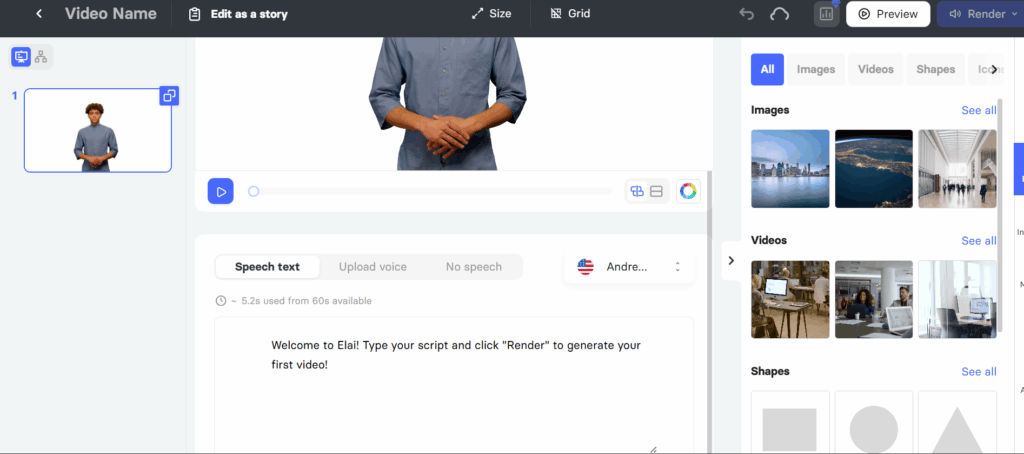
Elai emphasizes fast content generation from scripts. It’s useful for scalable content, but less expressive for entertainment or social media. It feels more like a simplified avatar studio. The script-to-video workflow is clear: paste your text, select an avatar, generate voice, export. It doesn’t try to be a full editing suite like VEED, and it doesn’t lean as heavily corporate as Synthesia.
What are Elai’s strengths?
- Beginner-friendly workflow
- Affordable entry pricing
- Template-based generation
- Faster setup for simple videos
What are Elai’s weaknesses?
- Limited avatar realism
- Smaller voice library
- Less expressive facial animation
Free vs. Paid Plans: 5 HeyGen Alternatives Comparison
Conclusion
The market for heygen alternatives is growing fast. No single platform fits everyone.
- For enterprise training → Synthesia
- For voice quality → ElevenLabs
- For editing flexibility → Veed
- For beginner simplicity → Elai
- For all-in-one video generator → LipSync
Among today’s HeyGen alternatives, LipSync is not trying to be everything—it’s focused on doing one thing exceptionally well:helping creators, marketers, educators, and entertainment users turn static visuals into expressive, localized videos quickly and reliably.
If you’re evaluating HeyGen alternatives with real production goals in mind—not demos, but repeatable results—LipSync may be the smartest choice for your workflow.